Page 2 of 3
Re: custom resize group handler
Posted: Thu Apr 12, 2012 12:06 pm
by lolokiki
le 002.
Re: custom resize group handler
Posted: Thu Apr 12, 2012 12:23 pm
by bn
Hi lolokiki,
I tried with "resize with handle_0.0.2" and it worked.
here I post a version "resize with handle_0.0.3", the only difference is that there is a player object among the objects and when you click outside of any object on the card the handles disappear.
please try this version and tell me if it works.
Kind regards
Bernd
Re: custom resize group handler
Posted: Thu Apr 12, 2012 12:42 pm
by lolokiki
I do not understand!?! I added a player and I get stuck on it ....
voir pj
In case, my config is win7 and livecode 4.6.4
Re: custom resize group handler
Posted: Thu Apr 12, 2012 12:46 pm
by lolokiki
the attachment does not seem to be past
Re: custom resize group handler
Posted: Thu Apr 12, 2012 1:16 pm
by bn
Hi lolokiki,
I tried the stack you posted " Resize with handle_0_0_3_with_my_player.zip" with LiveCode 4.6.4 on a Mac and it works as I expected it to work.
I select the player object with alt-click and the handles appear and I can resize the stack. If I click on the card the handles disappear.
I am a little at a loss. If you speak french you might post the problem in french. (I'll try my best and there are french speaking users on the forum)
Or if it is a Windows problem someone could test it on Windows.
Kind regards
Bernd
Re: custom resize group handler
Posted: Thu Apr 12, 2012 4:20 pm
by lolokiki
perhaps with a video

- url.jpg (9 KiB) Viewed 11420 times
when I do the test with the other (fields, images, ...) everything is ok but when I do the test with Quictime player I'm stuck and I have no choice but to close the program..... see the video
And confirm that it works under MacOS. But I am unable to find the reason of the problem
Re: custom resize group handler
Posted: Thu Apr 12, 2012 5:30 pm
by bn
Hi lolokiki,
NIce idea to make a video. I see the problem, strange. Since I don't have Windows I can only guess: it seems that the control does not get the mouseUp or mouseRelease message.
Could you try to add to the script of group "Resizer" the following script and tell me what if that helps?
Code: Select all
on mouseLeave
   put false into sTrack
end mouseLeave
Kind regards
Bernd
Re: custom resize group handler
Posted: Thu Apr 12, 2012 6:20 pm
by lolokiki
Unfortunately, same problem
Re: custom resize group handler
Posted: Thu Apr 12, 2012 6:56 pm
by bn
Hi lolokiki,
could you try to replace the "changeSize" handler in group "resize" with:
Code: Select all
on changeSize
      if  (the mouse is down) then
      put the mouseLoc into tMouseLoc
      add sDeltaX to item 1 of tMouseLoc
      add sDeltaY to item 2 of tMouseLoc
      put sObjRect into tNewObjectRect
      add item 1 of tMouseLoc to item 3 of tNewObjectRect
      if not sHorizontalRight then
         add item 2 of tMouseLoc to item 4 of tNewObjectRect
      end if

      -- check to set minumum width and height
      if item 3 of tNewObjectRect - item 1 of tNewObjectRect < sMinimum then
         put item 1 of tNewObjectRect + sMinimum into item 3 of tNewObjectRect
      end if
      if item 4 of tNewObjectRect - item 2 of tNewObjectRect < sMinimum then
         put item 2 of tNewObjectRect + sMinimum into item 4 of tNewObjectRect
      end if

      lock screen
      set the rect of sChangeThis to tNewObjectRect
      positionGroup tNewObjectRect
      unlock screen

      if changeSize is not in the pendingMessages then
         send changeSize to me in 2 milliseconds
      end if
   end if
end changeSize
and tell me if it helps?
Kind regards
Bernd
Re: custom resize group handler
Posted: Thu Apr 12, 2012 7:55 pm
by lolokiki
Je ne dirai qu'un mot: BRAVO! Heu, pardon, je voulais dire... I only say one word: BRAVO!
merci beaucoup
Re: custom resize group handler
Posted: Thu Apr 12, 2012 9:18 pm
by bn
merci lolokiki,
I was about to give up. That was just guessing. I still don't understand why the previous version did not work on Windows for a player object.
here I post a version of the resize with handle stack that should work with player objects on Windows.
I also did a little clean up of the code and commented a bit
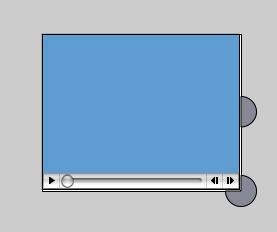
- Bildschirmfoto 2012-04-12 um 22.13.15.png (10.49 KiB) Viewed 11398 times
could you please test this stack also in case something went wrong?
Kind regards
Bernd
Re: custom resize group handler
Posted: Fri Apr 13, 2012 7:19 am
by lolokiki
It works perfectly!

Re: custom resize group handler
Posted: Thu May 24, 2012 6:24 pm
by lolokiki
Hi,
It's been awhile since I did not see you bored

I wanted to change the size of a Text field while allowing the user to write to it. I thought that creating a group with a field and something else (eg a rectangle) to use your script on the groups but can you use your two scripts "with handle_0_0_4.livecode Resize" and "ResizeGroup_0.0.4.livecode" at the same time?
thank you for your response
lolokiki
Re: custom resize group handler
Posted: Tue May 29, 2012 7:08 am
by lolokiki
I am not very sure of the translation of my first post(I hope I have not made a mistake) so I put my sentence in French:
je suis désolé de vous embêter à nouveau.
I wanted to change the size of a Text field while allowing the user to write to it. I thought that creating a group with a field and something else (eg a rectangle) to use your script on the groups but can you use your two scripts "with handle_0_0_4.livecode Resize" and "ResizeGroup_0.0.4.livecode" at the same time?
thank you for your response
Re: custom resize group handler
Posted: Tue May 29, 2012 12:09 pm
by bn
Hi lolokiki,
I was mostly offline because of pentecoste.
I don't quite understand what you mean by
but can you use your two scripts "with handle_0_0_4.livecode Resize" and "ResizeGroup_0.0.4.livecode" at the same time?
Do you want to use the external handles instead of the "internal" resize square? Do you mean multiple objects that you want to resize by "alt"-clicking on them and one of the objects has a text field?
Kind regards
Bernd