Page 2 of 2
Re: Creating Livecode .DEB package
Posted: Fri Jul 18, 2014 12:00 pm
by MaxV
It's not a real bug, update-app-install was a script to rebuild gnome app cache. However it is not necessary. I'll remove it immediately.
Moreover I just discovered libssl dependency (for encrypt command), so I'll add libssl-0.9.8 and libssl-1.0.0 packages.
Re: Creating Livecode .DEB package
Posted: Fri Jul 18, 2014 12:56 pm
by MaxV
Re: Creating Livecode .DEB package
Posted: Fri Jul 18, 2014 5:06 pm
by richmond62
Installed OK with GDebi.
Then did a
sudo apt-get update
followed by
sudo apt-get upgrade
No objects: Home Free!
Re: Creating Livecode .DEB package
Posted: Mon Jul 21, 2014 8:40 am
by MaxV
Ok, I added
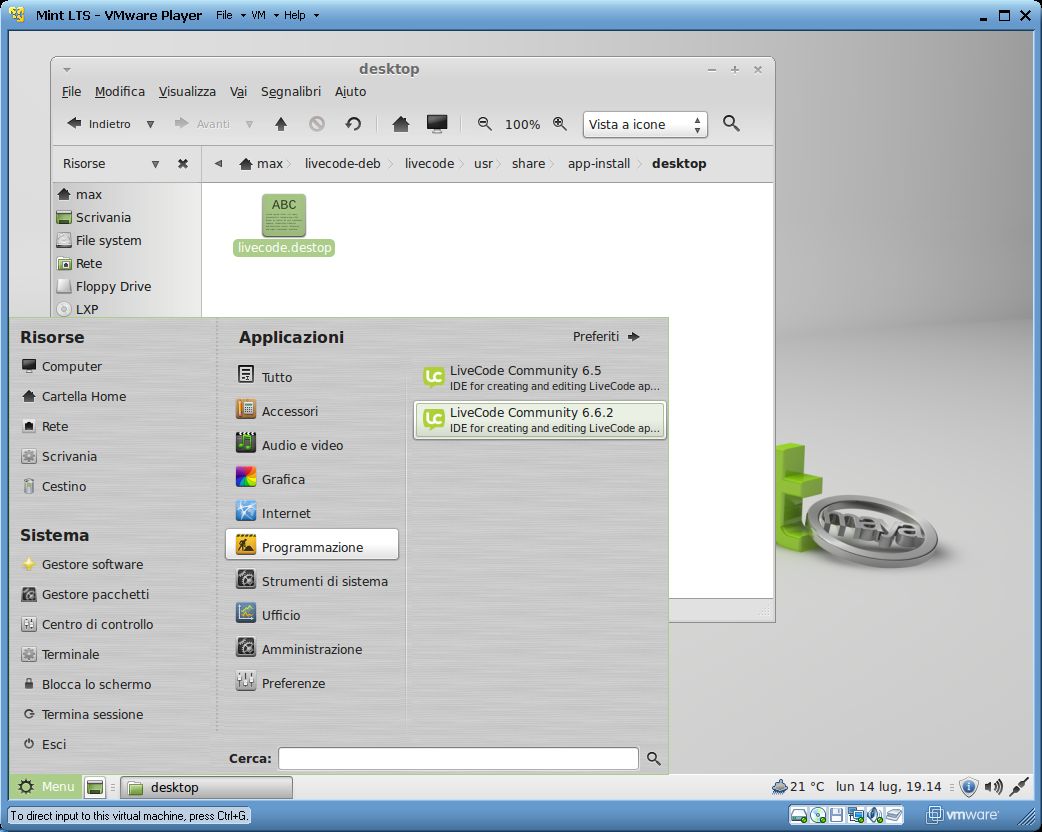
livecode.desktop file, that add icons, file associations (
livecode and
rev), and start menu buttons.
After installing the new package, you should see Livecode in menu. If you don't see it, try to log out and log in .
As usal packages are on
http://www.maxvessi.net/livecode/linux/
Re: Creating Livecode .DEB package
Posted: Sat Aug 16, 2014 9:10 pm
by richmond62
What are "start menu buttons" in relation to Linux?
I run Ubuntu Studio 14.0.1 on my "main man" and have two XFCE panels (top and bottom) for my menus.
I have WhiskerMenu in my top left hand corner, and the 'standard' XFCE panel Applications Menu near to my bottom right hand corner.
I run Zeven OS mucked about with XFCE and Avant Window Navigator on my laptop.
Dunno what 'buttons' are going to end up & where on these systems.
Re: Creating Livecode .DEB package
Posted: Sun Aug 17, 2014 8:34 pm
by Garrett
Meaning your main menu where you go to launch other programs, the menu where you see "Accessories, Graphics, Office, System, Preferences" etc. You will now find(if it didn't exists already) a new menu catagory likely titled "Programming"(possibly Development) where you will find a menu entry for LiveCode which will launch LiveCode when selected.
Re: Creating Livecode .DEB package
Posted: Sun Aug 17, 2014 8:39 pm
by Garrett
BTW, if it hasn't already been mentioned, if you remove the ".x86" from the name of the LiveCode install file your system will likely execute the file. I found on just about every Ubuntu based distribution that I've recently tried that I could not execute the LiveCode installer, even after setting appropriate permissions. Once I renamed the installer without the .x86 extension the installer fired right up without question and ran as intended. Had this problem with some other executable files as well. Seems Ubuntu ignores the permissions and seeks an association for the .x86 extention and of course doesn't find such.
~Garrett
Re: Creating Livecode .DEB package
Posted: Sun Aug 17, 2014 9:00 pm
by Garrett
MaxV wrote:Ok, I added
livecode.desktop file, that add icons, file associations (
livecode and
rev), and start menu buttons.
After installing the new package, you should see Livecode in menu. If you don't see it, try to log out and log in .
As usal packages are on
http://www.maxvessi.net/livecode/linux/
Many thanks for doing this for us.

~Garrett
Re: Creating Livecode .DEB package
Posted: Mon Aug 18, 2014 12:50 pm
by MaxV
richmond62 wrote:What are "start menu buttons" in relation to Linux?
I run Ubuntu Studio 14.0.1 on my "main man" and have two XFCE panels (top and bottom) for my menus.
I have WhiskerMenu in my top left hand corner, and the 'standard' XFCE panel Applications Menu near to my bottom right hand corner.
I run Zeven OS mucked about with XFCE and Avant Window Navigator on my laptop.
Dunno what 'buttons' are going to end up & where on these systems.
I mean this:
Re: Creating Livecode .DEB package
Posted: Mon Aug 18, 2014 3:13 pm
by richmond62
Got you.
Thanks!
Perhaps you should chnage the name of the "Livecode.destop" file to "Livecode.desktop"
Re: Creating Livecode .DEB package
Posted: Tue Aug 19, 2014 3:17 pm
by MaxV
richmond62 wrote:Got you.
Thanks!
Perhaps you should chnage the name of the "Livecode.destop" file to "Livecode.desktop"
You are right, I'm uploading a new version.
