Page 2 of 2
Re: How to Create a Command-Line Tool with LiveCode?
Posted: Mon Jul 15, 2019 7:12 am
by icouto
Hi there! Just checking whether with the upcoming version 9.5 there is now a (non-hacky) way to create compiled command-line tools with LiveCode? - i.e., a way that doesn't require us calling the tool with `-ui` arguments? Or is the only way still to just write uncompiled scripts that can be run by LiveCode Server?
Re: How to Create a Command-Line Tool with LiveCode?
Posted: Mon Jul 15, 2019 10:20 am
by bogs
Just curious, what makes adding '-ui' to the command to launch the program any more or less hacky than not using it?
I really am curious, not trying to be a jerk. Switches are common to almost any command line tool I can think of, no matter how you write them or launch them.
Re: How to Create a Command-Line Tool with LiveCode?
Posted: Mon Jul 15, 2019 7:19 pm
by FourthWorld
The -ui flag is only needed when using a standalone facelessly from the command line. It is not needed with LiveCode Server.
This blog article describes how to use LC Server outside of web serving, as a more general command-line program:
https://livecode.com/livecode-server/
Re: How to Create a Command-Line Tool with LiveCode?
Posted: Tue Jul 16, 2019 1:09 am
by icouto
@bogs What makes it 'hacky' is the fact that in order to control the output of the tool you MUST use the `-ui` flags every time you run it. It's perfectly fine to have your tool use flags, but no flags should be *required* for the tool to do its 'normal' function.
@FourthWorld Thanks for the link, but as you can see from my previous posts, I knew that already!

Ideally, it would be better to be able to ship a compiled tool, rather than just a script that requires the user to have LiveCode Server installed.
Re: How to Create a Command-Line Tool with LiveCode?
Posted: Tue Jul 16, 2019 8:08 am
by FourthWorld
It doesn't seem particularly onerous to have either a script + engine or a standalone with UI when shipping to an audience comfortable with command line execution.
What am I not understanding?
Re: How to Create a Command-Line Tool with LiveCode?
Posted: Tue Jul 16, 2019 9:34 am
by bogs
Like I said, I'm not sure what about that makes it 'hacky'.
I don't know which Os you are on, but, for instance, on Linux just off the top of my head, if you want to run dpkg, you are going to be using a switch. In fact, no part of dpkg (or many other) command line tools does *anything* unless you use a switch of some kind.
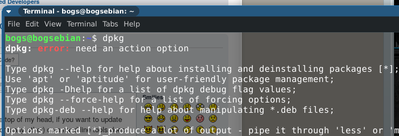
- I said DPKG DANGIT!
If you open a terminal, and type in 'dpkg', you get a manual page. Same with (almost) any other command I can think of. I don't remember as much of the Windows cli commands as I probably should, but from what I remember writing batch files, it was the same thing.
I guess our standards are just different, but having to use a switch on a cli command program doesn't strike me as anything other than normal. If you really want to ditch the switch for your end user, just write a bash/batch/launcher file for the Os end user to launch your program with the -ui, and tell them
*that* is the program. Problem solved
Re: How to Create a Command-Line Tool with LiveCode?
Posted: Fri Jul 19, 2019 5:24 pm
by mwieder
If you use the server product to run scripts then you don't need the "-ui" modifier. Here's a test script (I have the server in my path to avoid having to specify the complete path in the hashbang line:
Code: Select all
#!livecode-community-server
include "test1.lc"
local x, y
put 3 into x
breakpoint
put x into y
put "-- environment --" & cr
put "libraries=" && the libraries & cr
put "frontscripts=" && the frontscripts & cr
put "backscripts=" && the backscripts & cr
put "stacks=" && the stacks & cr
put "stacksinuse=" && the stacksinuse & cr

put "the version=" && the version & cr
put "the environment=" && the environment & cr
put "the editionType=" && the editionType & cr
put "the defaultFolder=" && the defaultFolder & cr
put "the defaultStack=" && the defaultStack & cr

put "-- dateItem test --" & cr
put 1489755600 into tVar
convert tVar to dateitems
put "fixed time (dateItems)=" & tVar & cr
get the time
convert it to dateitems
put "current time (dateItems)=" & it & cr
put the screenrect & cr
Here's the included test1.lc file:
Code: Select all
#!livecode-community-server
put "hello, world" & cr
Re: How to Create a Command-Line Tool with LiveCode?
Posted: Tue Nov 26, 2019 1:29 am
by karmacomposer
This is a GREAT question and forum thread. I have a similar question.
I have the need to create a system tray application and/or windows service. Can this be done in Livecode?
Mike
Re: How to Create a Command-Line Tool with LiveCode?
Posted: Tue Nov 26, 2019 5:24 pm
by Klaus
400,- (FOUR HUNDRED) US dollars, Mr.Felker!
Re: How to Create a Command-Line Tool with LiveCode?
Posted: Wed Sep 16, 2020 3:39 am
by seaniepie
Hi,
I know this is an old thread but thought it was the best place for this question.
In the Standalone Settings, Command-Line Option Parser is labelled as usable with HTML5. I'm wondering, how might someone use it?
I've done the usual google and release note searches but can find very little about it. The dictionary and user guide, not surprisingly, have very little information about it too.
Anyone have a clue how it would be used and called in html?