Page 2 of 3
Re: Circular Audio Progress bar
Posted: Wed Oct 02, 2019 12:00 pm
by richmond62
"Circular Audio Progress bar" is a funny title, as a Progress
bar is never circular.
So, "Suffer for it!":
-
Re: Circular Audio Progress bar
Posted: Wed Oct 02, 2019 1:37 pm
by [-hh]
Richmond wrote:You'll take the LCB road and I'll take the LC road, And I'll get my stack finished afore you.
Great words, but where is the audio part of your answer?
You didn't even notice that my solution above is pure LC Script.
So, what is your problem?
Re: Circular Audio Progress bar
Posted: Wed Oct 02, 2019 1:53 pm
by richmond62
So what is your problem?
Aha: so you're a qualified psychiatrist as well.

My "only" problem is that the circular progress "bar" is so simple
I wondered why it had to be delivered as a widget,
therefore making it more difficult for people to modify.
Yes! The "audio bit" is missing . . .
But. presumably this progress "thing" is meant to be used while
an audio files launches, so that "bit" should be elementary.
Re: Circular Audio Progress bar
Posted: Wed Oct 02, 2019 1:56 pm
by richmond62
It basically just fills the color of the stroke of the circle in sync with the audio playback time.
Aha: so it has to be synced with the length of the audio file.
Re: Circular Audio Progress bar
Posted: Wed Oct 02, 2019 2:04 pm
by [-hh]
The OP wrote:
How do you connect this to an audio timeframe?
"While an audio file launches" shows always a progress of 0%. And the length of the audio file shows always 100%.
Really simple, no "progress" needed.
So
finish your stack and show him that elementary thing, in LC Script. Move a player's slider and buttons and show that with your simple progress. My solution above does that, in LC Script, even creates the "progress" display by script, no LCB/widget needed.
Re: Circular Audio Progress bar
Posted: Wed Oct 02, 2019 2:36 pm
by richmond62
The last time I worked with audio in
LIveCode it was called
Runtime Revolution, in 2002, and was dependent on
Quicktime,
so I will leave the "audio bit" to someone who is a 'twitch' more up to date re audio in
LIveCode .
-

- RR.jpg (6.23 KiB) Viewed 16486 times
Re: Circular Audio Progress bar
Posted: Wed Oct 02, 2019 2:54 pm
by [-hh]
I used the player object not yet in LC 9, so detected now a small bug with it in LC 9 (return sometimes a currentTime > duration). Edited my solution above by a 'work around'.
@Richmond.
Anyway, now we know your problem: Answering the trivial part of a question only and at the same time judging other (full) answers as "complicated" ...
Re: Circular Audio Progress bar
Posted: Wed Oct 02, 2019 3:09 pm
by richmond62
Answering the trivial part of a question only and at the same time judging other (full) answers as "complicated" ...
OK, OK; you got me there: and I do apologise.

Re: Circular Audio Progress bar
Posted: Wed Oct 02, 2019 3:31 pm
by [-hh]
Never mind. Often you are right when simplifying complicated things. (But not always.)
Re: Circular Audio Progress bar
Posted: Wed Oct 02, 2019 4:22 pm
by dpalmersce@gmail.com
WOW! This is the best forum I have been part of! Thank you very much for all your help! I hope I get to the point that I can contribute to help people, too! I am a long time Adobe(wished it had still been Macromedia) Director. Livecode is very similar but still enough differences that it takes me a little bit to delete the Director knowledge and think in the way Livecode expects it. Thank you again so much for the help!
Re: Circular Audio Progress bar
Posted: Wed Oct 02, 2019 7:31 pm
by richmond62
So: how does one find the
length of an
audioClip programmatically?
-
- Screenshot 2019-10-02 at 21.41.11.png (13.89 KiB) Viewed 16420 times
-
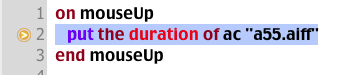
You can get the
duration of a
player . . .
Re: Circular Audio Progress bar
Posted: Wed Oct 02, 2019 7:41 pm
by Klaus
I'm afraid we can't!
Re: Circular Audio Progress bar
Posted: Wed Oct 02, 2019 7:49 pm
by richmond62
That's "
a pity" . . .
OK: so, having done this:
Code: Select all
put the duration of player "wazoo"
and got: 119808
and having done this:
Code: Select all
put the timescale of player "wazoo"
and got: 48000
and reading this:
The timeScale is the number of intervals per second of a movie or sound.
These intervals are used for the player's startTime, endTime, duration, and currentTime properties,
and you can use the timeScale property to convert from the time scale used by the movie or sound to seconds.
The inevitable Q has got to be how to use those 2 numbers to work out
ticks for a
progress bar/circle.
The Happy MacOS 'get info' thing states that my a55.aiff file has a duration of 2 seconds,
but 119808 / 48000 gives me 2.496
Of course MacOS could be rounding down, or 2.496 could mean something else.
Re: Circular Audio Progress bar
Posted: Wed Oct 02, 2019 8:05 pm
by richmond62
Blast!
-
-
Code: Select all
on mouseUp
   put the duration of player "wazoo" into DURANCE
   put the timescale of player "wazoo" into TS
   put ((DURANCE / TS) * 60) into TIX
   put (TIX/360) into DIVZ
   -----
   play player "wazoo"
   set the startAngle of grc "CRUNCH" to 0
   put 0 into DEG
   repeat until DEG > 360
      set the arcangle of grc "CRUNCH" to DEG
      set the label of grc "MASK" to DEG
      add 1 to DEG
      wait DIVZ ticks with messages
   end repeat
   -----
end mouseUp
The sound file finishes while the progress graphic is about half complete:
probably because
LiveCode does not like.
wait 0.416 ticks
Re: Circular Audio Progress bar
Posted: Wed Oct 02, 2019 8:15 pm
by richmond62
I'm afraid we can't!
I really hate that word '
can't'
!
And we
can:
Code: Select all
on mouseUp
   put the size of audioClip "a55.aiff" into SZ
   put (SZ / 4)
end mouseUp
gave me exactly the same value as the duration of a player
linked to an external instance of the sound file 'a55.aiff'.