Page 2 of 4
Re: Calendar widget
Posted: Mon Nov 30, 2020 1:06 am
by SparkOut
Mmmm, I wonder if it will be as happy on Windows.
Normal date handling in LCS on Windows will fail with dates pre 1970.
Re: Calendar widget
Posted: Tue Dec 01, 2020 5:58 pm
by marksmithhfx
SparkOut wrote: Mon Nov 30, 2020 1:06 am
Mmmm, I wonder if it will be as happy on Windows.
Normal date handling in LCS on Windows will fail with dates pre 1970.
Could someone give it a try and let me know? I don't have access to a Window's machine at the moment.
BTW, I've jazzed up the calendar widget a bit (see if you can spot the difference) and polished the conversion routines. I guess the next step is to try and deploy it in a stack. I'm hoping the popup widget command will do the trick.
Mark
Re: Calendar widget
Posted: Tue Dec 01, 2020 6:46 pm
by mrcoollion
Windows 10 machine.
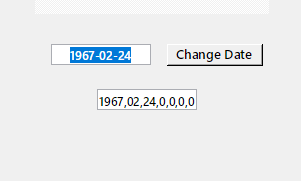
- PrtScrnWin10.png (3.58 KiB) Viewed 9783 times
Re: Calendar widget
Posted: Tue Dec 01, 2020 8:45 pm
by SparkOut
Pre 1970 if you click the convert button, it will show some "dateItems" (as generated by the functions in the card script, but which fail to be converted into a date format in the field instead of a formatted date.
Then trying to change the date via selecting the navigation arrows in the calendar widget pane gives an error: button "right": execution error at line 22 (LCB Error in file calendar.lcb at line 305: Value is not of correct type for assignment to variable - expected type <type: livecode.lang.number> for assigning to variable mSelectedYear in com.livecode.widget.calendar.)
Re: Calendar widget
Posted: Tue Dec 01, 2020 9:35 pm
by marksmithhfx
Great, thanks all. Looks like the LC convert command is the limiting factor. It is probably Windows dependant in someway. When I get some spare moments I'll write a replacement (just specifically for this stack/solution). Shouldn't be too hard to work out.
Thanks, the feedback has been very helpful.
Mark
Re: Calendar widget
Posted: Wed Dec 02, 2020 5:20 pm
by marksmithhfx
Does anyone know if this will work with the popup widget command in LC? I tried making it work but I don't know how to get to be a reasonable size... it's just all squished up at the top left of the screen (I used 0,0 as a starting point ).
Thanks
Re: Calendar widget
Posted: Wed Dec 02, 2020 5:42 pm
by Klaus
Hi Mark,
just tested here and I can confirm it does NOT woek as advertized!
-> Yep, it's just all squished up, no matter WHERE I let it popup.
So please bugreport this, thanks.
Best
Klaus
Re: Calendar widget
Posted: Wed Dec 02, 2020 8:13 pm
by bn
Hi Mark,
The example form the dictionary for popUp adapted to calendar widget:
Code: Select all
on mouseDown theButton
   if theButton is 3 then
      local tProps
      put "200,200,500,500" into tProps["rect"]
      popup widget "com.livecode.widget.calendar" with properties tProps
      if the result is not "Cancel" then
         put it
      end if
   else
      pass mouseDown
   end if
end mouseDown
That works if you pass it a reasonable rect
I guess it is not a bug.
Kind regards
Bernd
Re: Calendar widget
Posted: Wed Dec 02, 2020 8:50 pm
by Klaus
Yes, this works!
Oh boy, I should also read the fineprint next time...

Re: Calendar widget
Posted: Wed Dec 02, 2020 9:16 pm
by bn
And I also should be more precise:
the rect is best defined by starting at 0,0
So the line for the rect should read
Code: Select all
put "0,0,200,200" into tProps["rect"]
Not starting at 0,0 did not hurt but is confusing.
Kind regards
Bernd
Re: Calendar widget
Posted: Thu Dec 03, 2020 1:05 am
by SparkOut
Just as an aside, the determination of whether a year is a leap year is not solely judged by whether it is divisible by 4. (1900, for instance is not a leap year. Century years must be divisible by 400 to be a leap year.)
Revised function:
Code: Select all
function isaLeap pYear
   // returns true if it is a leap year
   if pYear mod 4 is not 0 then return false
   if pYear mod 100 is not 0 then return true
   if pYear mod 400 is 0 then return true
   return false
end isaLeap
Re: Calendar widget
Posted: Wed Dec 09, 2020 12:10 am
by marksmithhfx
SparkOut wrote: Thu Dec 03, 2020 1:05 am
Just as an aside, the determination of whether a year is a leap year is not solely judged by whether it is divisible by 4. (1900, for instance is not a leap year. Century years must be divisible by 400 to be a leap year.)
Thanks, I wasn't sure what a good way to do that in LC would look like. Some other languages I've learned (notably Pascal) only allow 1 return value per function. So this solution did not occur to me. Its clever.
Mark
Re: Calendar widget
Posted: Wed Dec 09, 2020 8:39 am
by SparkOut
It's just a shorthand way of checking the conditions without wrapping in "if...else...end if" constructions. There's only ever one value returned. With (thankfully) lazy evaluation you get "condition test failed...meh" and moving on to the next statement without importance whether the action on true was to return a value or put "cheesecake" in tOven. If the test passed, then the return statement is actioned, and that return exits the handler without and further statements being processed.
I am big on verbosity and almost always put full if...end if statements, but on certain occasions the single liner can be neat.
Re: Calendar widget
Posted: Wed Dec 09, 2020 3:44 pm
by marksmithhfx
bn wrote: Wed Dec 02, 2020 8:13 pm
Hi Mark,
The example form the dictionary for popUp adapted to calendar widget:
That works if you pass it a reasonable rect
I guess it is not a bug.
Thanks Bernd, I stumbled on the same example and have been playing around with it. I ended up with this:
Code: Select all
on mouseUp
   put the date into tToday
   put shortDate2sqlDate(tToday) into pDate
   put "0,0,234,234" into tProps["rect"]
   put pDate into tProps["selectedDate"]
   put "Red" into tProps["hiliteColor"]
   put "Background" into tProps["hiliteStyle"]
   popup widget "com.livecode.widget.calendar" at the mouseLoc with tProps
   put it into pDate
   answer pDate
end mouseUp

function shortDate2sqlDate pDate
   // converts a LC short date (mm/dd/yy) to an SQL date (yyyy-mm-dd)
   convert pDate to dateItems
   set the itemDelimiter to comma
   put item 1 to 3 of pDate into newSQLdate
   replace comma with "-" in newSQLdate
   return newSQLdate
end shortDate2sqlDate
Which works great when popped up from an SVG icon, but not so well when popped up from a navbar. I've attached an example stack (just click on the SVG icon, or the navbar, code is identical in both). Also, if you compile this it exhibits the same problem in iOS. Not sure what's causing it.
Mark
Re: Calendar widget
Posted: Wed Dec 09, 2020 3:48 pm
by marksmithhfx
SparkOut wrote: Wed Dec 09, 2020 8:39 am
It's just a shorthand way of checking the conditions without wrapping in "if...else...end if" constructions. There's only ever one value returned. With (thankfully) lazy evaluation you get "condition test failed...meh" and moving on to the next statement without importance whether the action on true was to return a value or put "cheesecake" in tOven. If the test passed, then the return statement is actioned, and that return exits the handler without and further statements being processed.
I am big on verbosity and almost always put full if...end if statements, but on certain occasions the single liner can be neat.
Actually I was just being really lazy and planned to go back and fix it, but you beat me to it

I may have over-interpreted some languages instance on returning one value as having one return statement. Or maybe there was a language like that once and I ended up learning it. Sometimes hard to re-train us old dogs