Page 2 of 3
Re: Control of Text Fields
Posted: Thu Nov 11, 2021 8:52 pm
by kray
Great stack, Roger! I know I'm kind of late to the party, but just FYI you can also use the
type command for entering the numbers (an oldie, but a goodie):
Code: Select all
-- Modifying your behavior script
on mouseUp
  type (the label of me)
end mouseUp
Also, for the "Del" button, I think this simple script would work:
Code: Select all
on mouseUp
  delete char (word 4 of the selectedChunk) of the focusedObject
end mouseUp
(and if you ever needed a "forward delete", you could just change it to "word 2 of the selectedChunk")
Just my 2 cents,
Ken
Re: Control of Text Fields
Posted: Sat Nov 13, 2021 12:32 am
by RogGuay
Thank you for these tips, Ken. Is there am advantage to using the type command over put?
Roger
Re: Control of Text Fields
Posted: Sat Nov 13, 2021 8:57 am
by richmond62
Oddly enouugh,
TYPE does not seem to be in the dictionary.
For the sake of argument this script locks up Livecode:
Code: Select all
on mouseUp
   put fld "f3" into GUFF
   put GUFF into fld "f1"
   type GUFF into fld "f2"
end mouseUp
Re: Control of Text Fields
Posted: Sat Nov 13, 2021 9:45 am
by Klaus
richmond62 wrote: Sat Nov 13, 2021 8:57 amOddly enouugh,
TYPE does not seem to be in the dictionary...
Is that so?
Re: Control of Text Fields
Posted: Sat Nov 13, 2021 9:50 am
by richmond62
-
NO, it is NOT so . . .
Allow me to blame that on the fact I have only had my first cup of coffee this morning.

The spelling of "enouugh" should be a dead give away.
AND, why, forbye, does this:
Code: Select all
on mouseUp
   put fld "f3" into GUFF
   put GUFF into fld "f1"
   type GUFF into fld "f2"
end mouseUp
NOT result in the TEXT in GUFF being typed into fld "f2"?
I'm aye forfochen.

Disnae seem to like this either:
-
Re: Control of Text Fields
Posted: Sat Nov 13, 2021 10:10 am
by bn
From the dictionary:
The type command does not automatically place an insertion point in a
field, so if you want to simulate typing into a field, you must first
use the select command to place the insertion point:
select after field "Data"
type "Hello"
Try this.
Kind regards
Bernd
Re: Control of Text Fields
Posted: Sat Nov 13, 2021 10:14 am
by Klaus
OK, then you need to read the whole thingie!

This is how to do it, as mentioned in the dictionary:
Code: Select all
on mouseUp
   put fld "f3" into GUFF
   put GUFF into fld "f1"

   ## We cannot TYPE diretly INTO, thus:
   focus on fld "f2"
   ## or to specify an insertion point if there is already text in the target field:
   ## select AFTER fld "f2"

   ## NOW:
   type GUFF
end mouseUp
Re: Control of Text Fields
Posted: Sat Nov 13, 2021 5:46 pm
by richmond62
I did mention the lack of a second cup of coffee.
-
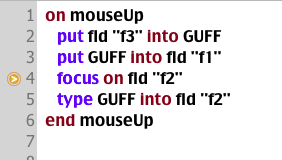
- SShot 2021-11-13 at 18.46.16.png (16.37 KiB) Viewed 14373 times
-
?
-
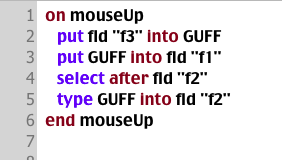
- SShot 2021-11-13 at 18.48.07.png (16.47 KiB) Viewed 14373 times
-
At which point LiveCode froze.
-
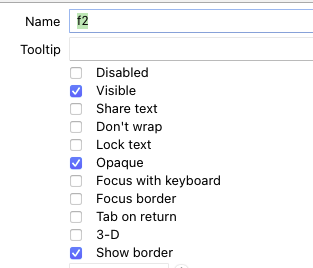
- SShot 2021-11-13 at 18.51.01.png (17.64 KiB) Viewed 14370 times
-
Aah.
Re: Control of Text Fields
Posted: Sat Nov 13, 2021 5:53 pm
by richmond62
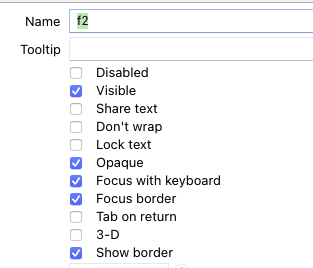
- SShot 2021-11-13 at 18.52.32.png (17.69 KiB) Viewed 14368 times
-
Code: Select all
on mouseUp
   put fld "f3" into GUFF
   put GUFF into fld "f1"
   focus on fld "f2"
   type GUFF into fld "f2"
end mouseUp
No.
Re: Control of Text Fields
Posted: Sat Nov 13, 2021 5:59 pm
by richmond62
-
Is this because:
1. My text in my original variable is far too large?
2. LC does not like to
TYPE from a variable?
-
-
Apparently #1
-
BUT . . . 'No' . . . after that the thing mysteriously works.
The "advantage" of
TYPE s that the text takes up to 10 times as long to end up in the target field, BUT you
can have the pleasure of watching it appear letter-by-letter.
BUT "threw a bluey at the end":
-
Re: Control of Text Fields
Posted: Sat Nov 13, 2021 6:04 pm
by richmond62
Somewhat underwhelmed by TYPE.
Re: Control of Text Fields
Posted: Sat Nov 13, 2021 6:40 pm
by jacque
RogGuay wrote: Sat Nov 13, 2021 12:32 am
Thank you for these tips, Ken. Is there am advantage to using the type command over put?
The put command involves no messages, the text goes directly into the field. The type command simulates user interaction and sends all the normal messages - keyDown, keyUp, etc. So if you have handlers that monitor user typing, they will trigger normally when the type command executes.
Re: Control of Text Fields
Posted: Sat Nov 13, 2021 6:45 pm
by jacque
The "advantage" of TYPE s that the text takes up to 10 times as long to end up in the target field
Set the typingRate to 0. The default is 100ms.
Re: Control of Text Fields
Posted: Sat Nov 13, 2021 7:59 pm
by richmond62
Ouch, trust
Jacque to "pip me at the post": what can I say, except,
Lots of love, Richmond.

Between
Jacque and
Klaus I am doubly humbled.
Re: Control of Text Fields
Posted: Sun Nov 14, 2021 12:10 am
by alextweedly
Ken,
you suggested a simpler version for the Del button, namely
[code]
on mouseUp
delete char (word 4 of the selectedChunk) of the focusedObject
end mouseUp
[/code]
but this doesn't work correctly in the case of an active text selection; the desired (correct) effect in that case is to delete the selected text, while this simple suggestion removes only the last character.
A simple fix is to do
[code]
on mouseup
type " " -- remove existing selection if there is one, then add a space
delete char (word 4 of the selectedChunk) of the focusedObject -- remove that space
end mouseUp
[/code]
Sorry - can't figure out how to get code inserted properly !?