Page 2 of 2
Re: Search & Replace being a bit unhelpful
Posted: Thu Jan 13, 2022 6:26 pm
by Martin Koob
Hi bernd
using 'put the mouse stack' in the message box is a great idea. Adding that to my tricks
What I do to figure out a name is while the stack is open put 'put the openstacks' in the message box & press return and then look in the resulting list for anything that looks like it is the stack I want.
To confirm I close the stack in question and again put 'put the openstacks' in the message box & press return and see what is different.
Your way is much more efficient.
Martin
Re: Search & Replace being a bit unhelpful
Posted: Thu Jan 13, 2022 6:31 pm
by bn
Hi Martin,
thanks,
along the same line is
Code: Select all
put the long name of the mouseControl
Typed into the message box and after moving the cursor over a control and then hitting the return key.
I find that most useful when "sniffing around"
Kind regards
Bernd
Re: Search & Replace being a bit unhelpful
Posted: Thu Jan 13, 2022 6:56 pm
by Klaus
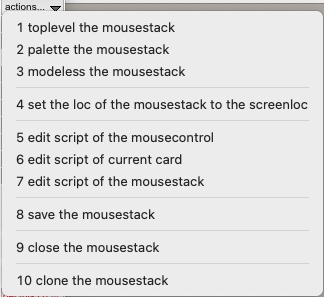
In my custom palette I have some handy commands using "the mousexxx"
These are fired 2 secs after selecting the menu item.
- mouse_x.jpg (40.16 KiB) Viewed 6427 times
Re: Search & Replace being a bit unhelpful
Posted: Fri Jan 14, 2022 12:29 am
by Martin Koob
Hi
Just playing around with some ideas and I thought of putting a script in the front script that would identify the stack the mouse was in.
- created a stack and called it "Main"
- created a sub stack in it and called it "sub"
- created a button "Stack Name Reporter" on the first card of stack "Main" and added the following script to that button
Code: Select all
on mouseEnter
   put the short name of this stack
end mouseEnter

on mouseLeave
   put empty into message box
end mouseLeave
-created a button "insert front script" on the first card of stack "Main" and added the following script
Code: Select all
on mouseUp
   insert the script of button "Stack Name Reporter" into front
end mouseUp
Next
-click the button "insert front script"
Result
- as you move the mouse around the name of the stack that the mouse is currently over is shown in the message box.
I attached the simple stack here.
Martin
Re: Search & Replace being a bit unhelpful
Posted: Fri Jan 14, 2022 9:49 am
by richmond62
I wonder if there wouldn't be a way to move that
into a plugin?
Re: Search & Replace being a bit unhelpful
Posted: Fri Jan 14, 2022 4:29 pm
by FourthWorld
richmond62 wrote: Fri Jan 14, 2022 9:49 am
I wonder if there wouldn't be a way to move that
into a plugin?
A plugin is a stack file placed in the Plugins folder.
Re: Search & Replace being a bit unhelpful
Posted: Fri Jan 14, 2022 4:31 pm
by Martin Koob
I don't think there is any reason why not.
If anyone is interested in creating plugins they should buy Andre Garcia's book
Development Oriented Developmenthttps://andregarzia.com/books/developme ... pment.htmlto learn how you can do that.
As I was making the simple demo stack I also thought it could report a host of things the object,[group],card,stack,mainstack,filepath
- then I thought maybe they could be in a floating multi line field, not in the message box
- then I thought you could use a key combo to to lock the field in place and click on a line to open the script, the property inspector, reveal stack in finder, etc.
- then I thought I need to get back to my actual work.

So If anyone wants to take this further be my guest. It would be a great plugin.
Martin