Page 2 of 3
Re: I have a problem. How can I make the button stop receiving clicks until the action inside it is finished?
Posted: Tue Oct 10, 2023 2:38 pm
by Klaus
Yes, Craig MUCH better!

Code: Select all
on mousedown
   set the label of button "Avvio" to "STOP"
   repeat until the mouseClick or fld "Timer" is "00:00"
      set the label of button "Avvio" to "STOP"
      wait 1 second
      ---put flushEvents("mousedown") into ttmp
      set itemdel to ":"
      put item 2 of fld "timer" into tsecondi
      put item 1 of fld "timer" into tminuti
      switch
         case tsecondi =00
            put "59" into tsecondi
            put tsecondi into item 2 of fld "timer"
            subtract 1 from tminuti
            if the length of tminuti is 2 then
               put tminuti into item 1 of fld "timer"
            else
               put "0"& tminuti into item 1 of fld "timer"
            end if
            break

         case tsecondi <=9
            subtract 1 from tsecondi
            if the length of tsecondi is 2 then
               put tsecondi into item 2 of fld "timer"
            else
               put "0"&tsecondi into item 2 of fld "timer"
            end if
            break

         case tsecondi >9 and tsecondi <59
            subtract 1 from tsecondi
            if the length of tsecondi is 2 then
               put tsecondi into item 2 of fld "timer"
            else
               put "0"&tsecondi into item 2 of fld "timer"
            end if
            break

         case tsecondi =59
            subtract 1 from tsecondi
            put tsecondi into item 2 of fld "timer"
            break
      end switch
   end repeat
   set the label of button "Avvio" to "START"
end mousedown
Re: I have a problem. How can I make the button stop receiving clicks until the action inside it is finished?
Posted: Tue Oct 10, 2023 3:09 pm
by dunbarx
So I made a new stack with the controls required, and pressed btn "avvio".
The timer starts and counts down to -10. Note that since you set the itemDel to ":", and you put item 2 of a value into a variable, LiveCode will include the delimiter itself, in order to properly give the correct representation of the value. You get ":-1" for example.
Problem. You need to rethink that, since one cannot subtract a number from the string ":-1".
Write back as you develop.
Craig
Re: I have a problem. How can I make the button stop receiving clicks until the action inside it is finished?
Posted: Tue Oct 10, 2023 3:27 pm
by crokyweb
In the "timer" field write 01:20 and then click the "Start" button with the script written above inside.
It works but if I want to stop the countdown at 0:30 it doesn't stop it continues until 00:00 and then rightly stops because the time is up
Re: I have a problem. How can I make the button stop receiving clicks until the action inside it is finished?
Posted: Wed Oct 11, 2023 1:06 am
by stam
Wowsers... as Craig says please DO use the code tags!
For starters, you've gone the long way about ensuing the numbers have a leading 0 where needed.
LiveCode has you covered with the
format function (you can read up on it in the dictionary).
the long and short of it is if you want to pad a single integer with a leading 0 for a 2-digit number, set that number to:
Code: Select all
format("%02u",<the number in question>)
This means that if the number in quest is for example 7, the following will return 07:
Code: Select all
format("%02u",7) -- returns 07
-- or --
format("%02u",7 - 1) -- returns 06
Your code struggles bit if there isn't an initial value set in the TIMER field. But more than that, you are making your life more difficult by trying to do everything in a single mouseDown handler 'just because you can'.
Think about it: if you want things to happen while the user is actually clicking the mouseDown button then yeah that's fine. But in your case, what you want is to respond to a mouseUp and respond differently to a
second mouseUp, depending on whether the timer is counting down.
Everything is much easier if you just track what the field is doing and act accordingly. This is very easy to do with a
script local variable, in other words a variable that is available to ALL the handler in a particular script (In this case the button script) and persists while the app is running, so it remembers what you put in it for subsequent operations.
So if the flag is true (ie timer is running) you want to stop it and reset it; and if not, you want to start it. But you also want perhaps a different outcome if the timer runs out (for example change the label of the button to "TIME"S UP" or do some other action).
In the script below the flag that tracks if the timer is running is sRunning. I also put the default initial mins and secs script local variables so you can change them in one place.
The mouseUp handler just checks if the timer is running (in which case it calls resetCounter to stop/reset) and if not then it calls countDown, to start the countDown. the code below shortens the script you used to pad with a leading 0 if needed as above but is more verbose and easier to change if needed. This is the script for button "Avvio" and assumes there is a field called "Timer"
Code: Select all
local sRunning
local sMinutes = 01
local sSeconds = 20

on mouseUp
    if sRunning then
        resetCounter
    else
        countDown
    end if
end mouseUp

command resetCounter
    beep
    put false into sRunning -- ie mark the timer as not running
    set the label of button "Avvio" to "START"
    put format("%02u",sMinutes) & ":" & format("%02u",sSeconds) into field "Timer"
    exit to top -- stops everything
end resetCounter

command countDown
    local tMinuti, tSecondi
    put true into sRunning -- mark the timer as running
    set the itemDelimiter to ":"
    put item 1 of field "timer" into tMinuti
    put item 2 of field "timer" into tSecondi
    set the label of button "Avvio" to "STOP"
    repeat
        wait 1 second with messages // 'with messages' ensures interface updates
        if tSecondi <> 0 then
            put format("%02u", tSecondi -1) into tSecondi // decrememnt seconds and format with padding 0 if needed
            put tSecondi into item 2 of field "timer"
        else
            if tMinuti = 0 then
                set the label of button "Avvio" to "TIME'S UP" -- or trigger some other action
                exit to top // stops everything
            else
                put 59 into tSecondi
                put tSecondi into item 2 of field "timer"
                put format("%02u", tMinuti -1) into tMinuti // decrememnt minutes and format with padding 0 if needed
                put tMinuti into item 1 of field "timer"
            end if
        end if
    end repeat
end countDown
Hope that makes sense
Stam
Re: I have a problem. How can I make the button stop receiving clicks until the action inside it is finished?
Posted: Wed Oct 11, 2023 4:03 am
by dunbarx
Hi.
I made a stack for you to try. See if it does what you want. It does require you to enter the starting time in the format "mm:ss" where mm and ss are both integers. It is straightforward, but care is taken to make the little things work. Can you see what those are?
Craig
Re: I have a problem. How can I make the button stop receiving clicks until the action inside it is finished?
Posted: Wed Oct 11, 2023 7:11 am
by richmond62
I experienced a similar problem using arrowKeys in a side-scrolling game, to stop hysterical end-users from either keeping a key pressed, or repeatedly pressing it.
Re: I have a problem. How can I make the button stop receiving clicks until the action inside it is finished?
Posted: Wed Oct 11, 2023 7:36 am
by stam
Except the OP now wants to react to a second mouse click to toggle both the state of the button and field content.
Re: I have a problem. How can I make the button stop receiving clicks until the action inside it is finished?
Posted: Wed Oct 11, 2023 8:18 am
by richmond62
Except the OP now wants to react to a second mouse click to toggle both the state of the button and field content.
I have 3 button mice connected to all my computers:
-
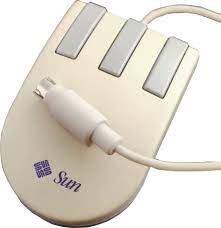
- 3Button.jpg (5.05 KiB) Viewed 17047 times
-
Personally I would consider the second click to be on button #2 or #3.
Otherwise things'll get complicated.
Re: I have a problem. How can I make the button stop receiving clicks until the action inside it is finished?
Posted: Wed Oct 11, 2023 8:29 am
by richmond62
Or:
-
-
Code: Select all
on mouseUp
   if the KOUNTER of me contains 1 then
      --- do action number 1
      set the KOUNTER of btn "BIG FAT BUTTON" to 2
   else
      -- do action number 2
      set the KOUNTER of btn "BIG FAT BUTTON" to 1
   end if
end mouseUp
Re: I have a problem. How can I make the button stop receiving clicks until the action inside it is finished?
Posted: Wed Oct 11, 2023 9:08 am
by crokyweb
thank you all for your support.
I almost got it all working.
my countdown should start from 20 minutes until reaching 0 with the possibility of stopping the countdown and restarting from where it stopped, all manageable with a single button. Attached you will find the file I created and it all works with one button using the function
repeat until the MouseClick or fld "Timer" is "00:00"
the problem is that if I start the countdown and click on the white background with the mouse, the countdown stops!!!! I have to inhibit the possibility of clicking on the white background. I need to be able to stop the countdown just from the button. Suggestions ?
Re: I have a problem. How can I make the button stop receiving clicks until the action inside it is finished?
Posted: Wed Oct 11, 2023 11:51 am
by stam
crokyweb wrote: Wed Oct 11, 2023 9:08 am
the problem is that if I start the countdown and click on the white background with the mouse, the countdown stops!!!! I have to inhibit the possibility of clicking on the white background. I need to be able to stop the countdown just from the button. Suggestions ?
Well yes. This is expected behaviour because of the way you coded this and insist on sticking with it.
Because - unless you actually changed your button script - you do everything in a mouseDown handler and stop
on mouseClick. So any mouseClick anywhere who’ll do this. (Apologies if you have changed this, I can’t check right now).
What you seem to be asking for however is a button you can click to start the timer and on a second click will stop the timer. So you really shouldn’t have all the code in a single mouseDown handler, because you am really you are asking to respond to a mouseUp handler in two different ways.
So, here’s a funky suggestion: why don’t you try replacing your button script with the one I posted above (obviously just change the initial minutes/seconds at the top to 20 and 00 if you want a a 20 minute timer).
That should do what you want and not respond to mouseClick outside of the button…
Re: I have a problem. How can I make the button stop receiving clicks until the action inside it is finished?
Posted: Wed Oct 11, 2023 3:30 pm
by crokyweb
I wanted to thank everyone and in particular "dunbarx" because with his code I managed to do what I couldn't. Thanks also to "stam" who made me understand that the path I took hid some pitfalls. I attach the working stack and slightly modified by me
Re: I have a problem. How can I make the button stop receiving clicks until the action inside it is finished?
Posted: Mon Nov 06, 2023 4:42 pm
by crokyweb
Hi, I'm stuck with a problem that given my knowledge of livecode is not as accurate as yours, I'd like to submit to you. In part you have already helped me a lot in creating the CountDown and it works. The problem is that the seconds flow differently in the program. The countdown from 10 seconds to 0 by calculating hundredths of seconds lasts 17 seconds instead of 10 seconds (calculated with a chronograph.) The wai 1 second function works perfectly if alone. But if I insert it into a script it becomes longer because it considers the code written in the script. So I wonder how I can get a 10 second countdown with perfect hundredths as if I did it with a manual chronograph??? I hope I have been clear. If in doubt, I attach the example file. Thank you all
Re: I have a problem. How can I make the button stop receiving clicks until the action inside it is finished?
Posted: Mon Nov 06, 2023 7:12 pm
by dunbarx
Hi.
I threw this stack together. It works, but is not exactly accurate. Not sure how accurate it needs to be.
My real point in posting the stack is to find out why the handler proceeds about 9% FASTER than the real world. In other words, if I set the ten second timer in the stack, and compare with another reference, or even the milliseconds within LC itself, it completes in about 9.2 seconds.
This is odd to me, since there are a sprinkling of commands, including "wait" that would have made me expect that it should run slower, not faster.
I thought that the milliseconds were pretty accurate as a reference. Therefore waiting ten of those, and adding a few more lines of code to execute each pass, should slow it down, not speed it up.
The right way to do this is to read a reliable timing source and work from that.
Craig
Re: I have a problem. How can I make the button stop receiving clicks until the action inside it is finished?
Posted: Mon Nov 06, 2023 8:52 pm
by jacque
The system clock is not completely accurate. It can vary slightly if something else is using CPU cycles and doesn't yield to the OS. This can be any process, including those running in the background, not just LC. For this reason, Apple used to warn developers not to rely on the ticks for accurate timekeeping.
Years ago someone wrote a handler to try to overcome that. I don't have the actual script but I think it was Geoff Canyon who did it and it appeared to be pretty accurate. It had something to do with calculating a difference between the system time and the calculated time in order to predict the correct milliseconds for the next clock update. I'll see if I can find it, it was originally posted on the mailing list but that was many years ago.