Page 2 of 3
Re: applescript returning execution error
Posted: Thu Oct 27, 2022 8:41 am
by rodneyt
For anyone who would like to test this, I attach a stack.
Open OSX Calendar and select an event in your Work calendar then open stack and click the button.
Comment or uncomment the line "return localUIDs". For me it works for the localUIDs but fails when I try to interact with the Calendar app
Re: applescript returning execution error
Posted: Thu Oct 27, 2022 8:49 am
by bn
Rod,
What made the difference for me was to grant access to iCal
On top of that I had given LC access to
Automation
Files and Folders
Full Disk Accsess
Accessability
I did so from LC version 9.6.9 (rc 1) but Preferences changed that to 10.0.0 DP 4 automatically. Apparently it chooses the latest version.
Could you try that?
Kind regards
Bernd
Re: applescript returning execution error
Posted: Thu Oct 27, 2022 9:01 am
by bn
Rod,
Your script works for me with the access granted above as soon as I change the titel of the calendar to the name of an existing calendar.
If nothing is selected it returns an error
to avoid the error if nothing is selected change
-- AppleScript
Code: Select all
tell application "Calendar"
	if (count of items of localUIDs) is greater than 0 then
		set theProps to properties of event id (item 1 of localUIDs) of (last calendar whose name is "Work")
	else
		set theProps to "nothing selected"
	end if
end tell
return theProps
Kind regards
Bernd
Re: applescript returning execution error
Posted: Thu Oct 27, 2022 1:12 pm
by rodneyt
Bernd, brilliant observations. I will do some more testing tomorrow and confirm.
Re: applescript returning execution error
Posted: Thu Oct 27, 2022 1:36 pm
by rodneyt
How do I add an app to Calendar security preference? I have tried dragging and dropping to the field (after unlocking) didn't work....
How did you do it Bernd?
I might need to look into
https://apple.stackexchange.com/questio ... -on-mojave
Re: applescript returning execution error
Posted: Thu Oct 27, 2022 1:49 pm
by bn
If you look at the image in the link you posted you see "Calendar" listed. Select Calendar and then you have the option to add an app to Calendar. For me LC appeared there without being selected. I had to unlock "Privacy" in the lower left of the pane and I had to select LC.
If however Livecode is not listed among the apps that you want to give access to Calendar, then I do not know how to add LC.
Kind regards
Bernd
Re: applescript returning execution error
Posted: Thu Oct 27, 2022 9:48 pm
by rodneyt
Hmmm , itś indeed not listed. At least I know what the problem probably is!
Rod
Re: applescript returning execution error
Posted: Fri Oct 28, 2022 2:08 am
by rodneyt
Is it possible to list the security and privacy setting requirements for an application in plist, maybe I could build the app and get it working this way? Seems to me there should be a way for a Livecode app to explicitly declare the requirements it needs so that permissions can be requested from user.
I know that OSX Privacy and Security will fail silently if user tries to do something and they don't have permission (ie. it will only prompt you for permission once). In my case (for Calendar permission) it is not prompting me at all, and there's no way to manually add Livecode to the Privacy and Security Calendar pane.
Re: applescript returning execution error
Posted: Fri Oct 28, 2022 3:17 am
by rodneyt
Going to have a try adding Calendar entitlement to Levure build and see if I can build app that will request calendar privilege
https://developer.apple.com/documentati ... _calendars
Applescript accessing Calendar app requires correct entitlement (solved)
Posted: Fri Oct 28, 2022 3:33 am
by rodneyt
Success!
I added Calendar to the entitlements and built to a standalone, On running it now correctly prompts for the Personal Calendar access
Code: Select all
 <dict>
 ...
  <key>com.apple.security.personal-information.calendars</key>
    <true/>
    ...
  </dict>
Re: applescript returning execution error
Posted: Fri Oct 28, 2022 9:53 am
by rodneyt
For anyone following along, this Applescript will return the properties of the selected event in Apple Calendar, regardless of which calendar the user has selected.
It requires that you have installed CalendarLib EC, available here
https://latenightsw.com/freeware/
This works in script editor, I am now trying to get it working in Livecode.
Code: Select all
use AppleScript version "2.4" -- Yosemite (10.10) or later
use framework "Foundation"
use framework "EventKit"
use script "CalendarLib EC" version "1.1.4"
use scripting additions

-- Determine selected event
set defaultsReply to (do shell script "defaults read com.apple.ical SelectedEvents")

set localUIDs to {}
set {TID, text item delimiters} to {text item delimiters, quote}
set resultItems to text items of defaultsReply
set text item delimiters to TID
repeat with i from 1 to (count resultItems)
	if i mod 2 = 0 then set end of localUIDs to resultItems's item i
end repeat


set selectedID to (item 1 of localUIDs)
if selectedID = missing value then return empty
set theEKEventStore to fetch store
set theEvent to theEKEventStore's eventWithIdentifier:selectedID

set theCalID to theEvent's calendar()'s calendarIdentifier() as text

tell application id "com.apple.iCal" -- Calendar
	set theProps to properties of event id (item 1 of localUIDs) of calendar id theCalID
end tell

return theProps
Re: applescript returning execution error
Posted: Sun Oct 30, 2022 3:10 am
by rodneyt
For those of you following this thread, here is the final working version.
This script retrieves the active selection in Calendar from preferences (so it works, interestingly, even if user has quit calendar). By using the syntas "some calendar" we can avoid declaring which calendar the event is in - good because many users have lots of calendars so we want to avoid having to explicitly declare the calendar name in the script.
The previous example (see post above) using Calendar library, is more appropriate and useful if you will also need to change calendar data, but this approach here is fine if all you need is to read selection and properties. This avoids complexity of installing script libraries as part of installation of your Application.
it's probably also worth noting in passing that Apple are discouraging (it seems) workflow applications that use Applescript to do inter-application messaging. The Applescript team has apparently lost it's manager and only has staff for maintenance. The long term survival of Applescript seems doubtful, although nothing is confirmed at this stage. Apps that are using Applescript within the OSX Sandbox have some additional steps to go through as well. Happy to supply links if anyone is interested. This may be worth bearing in mind if you are creating an app that you want to submit to appstore as you may face difficulties.
Code: Select all
set defaultsReply to (do shell script "defaults read com.apple.ical SelectedEvents")

set localUIDs to {}
set {TID, text item delimiters} to {text item delimiters, quote}
set resultItems to text items of defaultsReply
set text item delimiters to TID
repeat with i from 1 to (count resultItems)
	if i mod 2 = 0 then set end of localUIDs to resultItems's item i
end repeat

tell application id "com.apple.iCal" -- Calendar
	set theProps to properties of event id (item 1 of localUIDs) of some calendar
end tell
return theProps
Re: applescript returning execution error
Posted: Sun Nov 27, 2022 7:52 pm
by Simon Knight
Hi,
I stumbled across this thread and it jogged my memory. Back in early 2020 I wrote what I think is called a Library Extension that reads data from the Calendar and returns this information in an array. Unfortunately the Covid crisis distracted me so I never documented my library extension. The library creates two new functions smkCheckAuth() -> returns string and smkGetListOfEvents(startDate,EndDate) which returns an array.
A quick and dirty code example is :
Code: Select all
global tArray
-- Sent when the mouse is released after clicking
-- pMouseButton specifies which mouse button was pressed
on mouseUp pMouseButton
  local tAuthStatus, tlist
   put empty into  fld "FldResult"
   put smkCheckAuth() into tAuthStatus

   if tAuthStatus is "Authorised" then
      put smkGetListOfEvents("2022-01-01","2023-12-31") into tArray
   else
      answer "Error, You need to grant permission for this application to access Calendars."
      exit mouseUp
   end if
   if the keys of tArray is empty then
      answer "no data returned"
   else
      repeat for each line tkey in the keys of tArray
         --put tArray[tkey] & cr & tArray[tkey] & cr after tList
         put tArray[tkey]["title"] & cr & tArray[tkey]["startdate"] & cr & tArray[tkey]["enddate"] & cr after tList
      end repeat
      put tList into fld "FldResult"
      beep
      answer "done"
   end if
end mouseUp
The array returned looks like this:
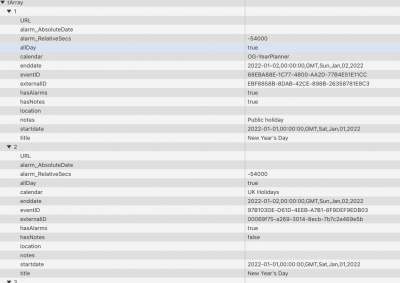
- Screen shot of the array returned by library.
My intention was to extend the commands to allow ToDos to be returned and eventually to provide functions to write events etc. Please let me know if you are interested and willing to do some beta testing and I will discover how to package it all up and send it to you. It even has some limited documentation

best wishes
Simon
Re: applescript returning execution error
Posted: Sun Nov 27, 2022 8:01 pm
by Simon Knight
P.S. Just discovered that I did post about the library in 2020
https://forums.livecode.com/viewtopic.p ... 29#p188029
Please note that the present version will not run on iOS owing to how LCB was in 2020. I have a feeling that it may now provide the command needed to allow access or prompt for access that is missing from the present 2020 version.
Re: applescript returning execution error
Posted: Sun Nov 27, 2022 8:16 pm
by Simon Knight
I have just created a 'package' which is attached below. I have no idea how its used but I suspect that the library manager will load it. Tools->Extension manager...... select the libraries tab and the add option.
Unable to attach it so I placed the package on dropbox :
https://www.dropbox.com/s/p2e10zishmfyp ... 4.lce?dl=0
S