these particular numbers
are in theory Unicode glyph addresses, and MOST of the time LiveCode behaves itself and interprets them as such (otherwise my Devawriter Pro would not work).
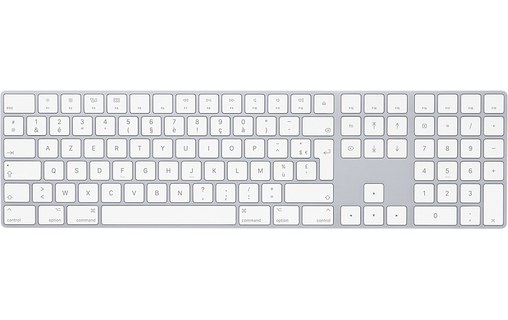
HOWEVER, while the number pad on the right-hand side of extended keyboards and F-keys do deliver what should be Unicode glyph addresses, LiveCode (and the OS in general) interprets them differently (hence my earlier reference to 'magic').
'Magic' (in the computer world at least) generally boils down to finding out what was going on in "Fred Flintstone's" head when he was programming the bit of code that results in the difficulty we are having.
If you feel a desperate urge you can find the rawKey codes for ALL the function keys and so on and then pop over to the Unicode consortium's website and look them up: believe me, I did this for an awful lot of writing systems, and developed quite a few fairly entertaining headaches doing so. Recently used two enormous exercise books full of Unicode addresses and fancy symbols from fancy languages to light the living-room fire.

THIS is NOT the problem.
The problem (such as it is) is that the OP is having a 'bad day' insofar as LC doesn't seem to love his keyboard (actually it is probably NOT a problem with his keyboard as he has tried a few of them, but, either what the OS on his machine does with a particular keyDown, or what LC does with is.
The claim (backed up by others) is that the combination of MacOS and a non-English language keyboard does not deliver an '=' to LC when the '=' is pressed on the number pad of those Mac keyboards. The claim is made more complicated by the fact that pressing on the '=' on the number pad in, say, TextEdit or LibreOffice DOES deliver an '=' sign.
So . . . my first question would be:
1. On an English language layout keyboard pressing the '=' on the number pad delivers the raw key code of 65469: ss that the raw key code delivered on a French AZERTY Mac keyboard?
1.1. If the answer is 'No', then the problem probably lies in LC insofar as MacOS will pick up "Wot Ever" from the '=' on the number pad regardless of what type it is (QWERTY, AZERTY, @#$%^&, and so on) and deliver an '=', while LC seems onbly able to do that with QWERTY keyboards.
My first question has already been answered: and the answer is 'Yes'.
So my second question is this:
2. Does LC detect what type of keyboard is connected to a computer, and for the sake of argument, differentiate between a QWERTY and an AZERTY in such a way that it responds differently whan the '=' is pressed on the number pad?
2.1. If the answer is 'Yes' then we need to ask if that is necessary? Does it have effects elsewhere? And if the answer to that one is 'No' the code that differentiates between keyboard types needs to be removed.