Page 3 of 4
Re: How to draw a rectangle with only two rounded corners?
Posted: Sat Nov 20, 2021 9:27 pm
by bn
Hi Richmond,
could you have a look at the points of grc "Polygon" and make sure that the point of the first line of the points is the same as the point of the last line of the points
If not then copy the point of the first line and put it into a new line after the last line of the points.
Or try
Code: Select all
put the points of grc "polygon into tPoints
   if line 1 of tPoints is not line -1 of tPoints then put cr & line 1 of tPoints after tPoints
set the points of grc "polygon to tPoints
Kind regards
Bernd
Re: How to draw a rectangle with only two rounded corners?
Posted: Sat Nov 20, 2021 9:58 pm
by bn
Hi Richmond,
That was indeed the problem.
What you also could do is to set the "opaque" of grc "Polygon" to true, that also closes the points
Kind regards
Bernd
Re: How to draw a rectangle with only two rounded corners?
Posted: Sat Nov 20, 2021 10:00 pm
by richmond62
Thanks so much, Bernd.
Bedtime round these parts: I'll try tomorrow.
Re: How to draw a rectangle with only two rounded corners?
Posted: Sun Nov 21, 2021 12:45 am
by stam
jacque wrote: Sat Nov 20, 2021 8:53 pm
I wasn't able to get this link to work, even after removing the extra spaces.
Yeh the link posted above has issues. The correct link to Andreas' repo is
https://github.com/Hoerwi/LC-Widget-customRect
Re: How to draw a rectangle with only two rounded corners?
Posted: Sun Nov 21, 2021 5:52 pm
by richmond62
SuperCard . . . I think it was called the Shrink Tool.
Well . . . I wonder how close SuperTalk is to LiveCode . . . ?
Of course Super Card is closed source as far as I know, so no "Chicken Nuggets".
But an attempt to copy functionality is not
haram.
Will have to download a trial on one of my cranky old Macs that can cope with 32-bit apps.
[Yes, Happy Campers, SuperCard is both 32-bit and has stated it is not likely to become 64-bit anytime
soon . . .]
Re: How to draw a rectangle with only two rounded corners?
Posted: Sun Nov 21, 2021 5:59 pm
by Andreas S.
stam wrote: Sun Nov 21, 2021 12:45 am
jacque wrote: Sat Nov 20, 2021 8:53 pm
I wasn't able to get this link to work, even after removing the extra spaces.
Yeh the link posted above has issues. The correct link to Andreas' repo is
https://github.

com/Hoerwi/LC-Widget-customRect
Jepp... i know... i cant post links here... only with "Spaces" it will accepted
Btw.. i´m workin on customRect2
Re: How to draw a rectangle with only two rounded corners?
Posted: Sun Nov 21, 2021 11:26 pm
by stam
Andreas S. wrote: Sun Nov 21, 2021 5:59 pm
Jepp... i know... i cant post links here... only with "Spaces" it will accepted
Yeah, I think you need to have made some 7 or 10 posts or something like that before you can post links...
Andreas S. wrote: Sun Nov 21, 2021 5:59 pm
Btw.. i´m workin on customRect2
Fantastic - look forward to it!
Re: How to draw a rectangle with only two rounded corners?
Posted: Mon Nov 22, 2021 10:50 am
by scott_morrow
The widgets being discussed here: Ralf Bitter's "Universal Button" and Andreas Strauch's "CustomRect"... should we expect that they would display properly on Android? Both of them appear to provide a nice solution in the IDE... but when I run them on Android they don't draw correctly. So far, fiddling with AcceleratedRendering hasn't helped.
Re: How to draw a rectangle with only two rounded corners?
Posted: Mon Nov 22, 2021 1:16 pm
by richmond62
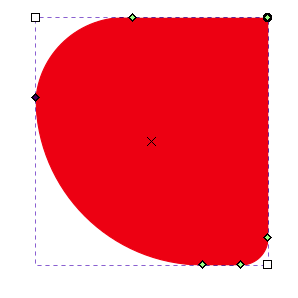
This is slightly OT, but I have been having a spot of recreation with
Inkscape:
https://inkscape.org/
-

- SShot 2021-11-22 at 14.14.36.png (6.92 KiB) Viewed 11733 times
-
- SShot 2021-11-22 at 14.15.11.png (8.65 KiB) Viewed 11733 times
-
Which I wish were a capability in
LiveCode.
Re: How to draw a rectangle with only two rounded corners?
Posted: Mon Nov 22, 2021 5:35 pm
by FourthWorld
richmond62 wrote: Sun Nov 21, 2021 5:52 pm
SuperCard . . . I think it was called the Shrink Tool.
Well . . . I wonder how close SuperTalk is to LiveCode . . . ?
The two languages are very similar, but just different enough that after doing several ports from SC to LC I came to the opinion that the better strategy is redesign with reimplementation by hand.
The Shrink tool, however, draws our attention to the biggest difference - not between the languages, but between the IDEs.
SC had something I've not seen elsewhere, SuperEdit, a separate environment focused on layout where you can operate without any scripts running.
Written entirely in C, SuperEdit had a few goodies that weren't part of the language.
If memory serves (it's been quite while since I ran SC), the Shrink tool was present only in SuperEdit.
If that's true, there's a good chance its code came from SuperPaint, another popular app from the same original publisher, Silicon Beach Software.
Even if SC's Shrink tool was only in SuperEdit, it should still be possible to script a similar thing in LC. I vaguely recall someone having done something quite similar here in these forums some years ago.
But it wouldn't be as easy as just looking at a SuperCard script for inspiration. It would need to be written from scratch.
And the original being in compiled object code and an LC version being in script, we should expect the usual performance differences between native and interpreted code.
Re: How to draw a rectangle with only two rounded corners?
Posted: Mon Nov 22, 2021 6:45 pm
by Andreas S.
scott_morrow wrote: Mon Nov 22, 2021 10:50 am
The widgets being discussed here: Ralf Bitter's "Universal Button" and Andreas Strauch's "CustomRect"... should we expect that they would display properly on Android? Both of them appear to provide a nice solution in the IDE... but when I run them on Android they don't draw correctly. So far, fiddling with AcceleratedRendering hasn't helped.
hmm... since I never thought about using it on mobiles, I must confess that I never thought about it.
So my question is, how do widgets in general that are not written exclusively for mobile behave on Android or iOS?
On Win-Systems and on my Raspberry (Debian and Ubuntu) they work fine.
I'll have to see how this must be defined for androids in the LCB.
Re: How to draw a rectangle with only two rounded corners?
Posted: Mon Nov 22, 2021 7:03 pm
by jacque
@scott How does it draw on Android? A screenshot would help. I wonder if it has to do with the automatic card resizing that happens on mobile.
Re: How to draw a rectangle with only two rounded corners?
Posted: Mon Nov 22, 2021 9:14 pm
by stam
jacque wrote: Mon Nov 22, 2021 7:03 pm
@scott How does it draw on Android? A screenshot would help. I wonder if it has to do with the automatic card resizing that happens on mobile.
+1!
That's a really good point @jacque - it probably needs careful scaling either with on resizeStack or with the geometry manager. Only a screenshot will tell!
Re: How to draw a rectangle with only two rounded corners?
Posted: Tue Nov 23, 2021 1:02 am
by scott_morrow
I'm not sure how to change the way the widget is drawn. I don't believe these widgets can be scaled like, for instance, an image... where the width and height may be reduced without changing the amount of pixel information, thereby increasing the pixel density. Simply changing the width and height doesn't seem to have any effect on the visual discrepancy. Also, I am not using any of the fullscreenmode settings. (As a test I tried setting the fullscreenmode to "noscale" but that didn't seem to change anything.)
I'm attaching three images as a comparison between what draws in the IDE and what draws on iOS and Android. (the iOS screenshot was from when the app was in darkmode) Be sure to click the image in order see the detail of the "crosshatching" background color that is drawn on Android.
Re: How to draw a rectangle with only two rounded corners?
Posted: Wed Nov 24, 2021 7:41 am
by richmond62
Sorry, I took so long, been away perverting young minds in my ESL school.
Thank you very much for this:
Code: Select all
What you also could do is to set the "opaque" of grc "Polygon" to true, that also closes the points
Fantastically useful bit of information.