Page 3 of 18
Re: Create a button's icon with a part of a big image?
Posted: Tue Aug 09, 2022 3:46 pm
by jacque
I forgot that the number of a control cann't be set by script

Layer is synonymous with number and you can set it in script. To make it easier, you can also use the reserved word "top" to set the layer of the control to the highest number available. That's what I did in my old Klondike game.
Oops, I see Bernd beat me to it.
Re: Create a button's icon with a part of a big image?
Posted: Tue Aug 09, 2022 3:52 pm
by Zax
Thanks again all!

Very nice demo stack,
richmond.
Keep you informed (... about my next problem

)
Re: Create a button's icon with a part of a big image?
Posted: Tue Aug 09, 2022 9:37 pm
by richmond62
... about my next problem
If your next problem is as easily sorted out as the recent ones that's OK with me.
Anything more complicated you should look to
Klaus or
Jacque.

Re: Create a button's icon with a part of a big image?
Posted: Wed Aug 10, 2022 10:57 am
by Zax
richmond62 wrote: Tue Aug 09, 2022 9:37 pmIf your next problem is as easily sorted out as the recent ones that's OK with me.
I don't know, you tell me
I'm using:
Code: Select all
intersect(draggedImg, targetImg, "pixels")
to hilite the image target but in some cases, dragged image intersects 2 possible targets.
In the case shown of the screenshot, one can't know on which target the dragged image will be dropped on
mouseOut event but *we hope* the correct target will be the Queen of Diamonds... So my question is: is there a way to restrain the "hot" rectangle of the dragged image?
I think I could do that without
intersect function and create my own function, maybe using
centerRect() but I'm afraid the card mouvement will be jerky, due to calculation loop.
Re: Create a button's icon with a part of a big image?
Posted: Wed Aug 10, 2022 11:12 am
by richmond62
I have NEVER heard of
mouseOut . . .
-
-
Obviously if your
drop targets are so near to each other that 2
intersect
signals fire at the same time you are going to be in the treacle.
-
- treacle.jpg (7.1 KiB) Viewed 11647 times
-
Solution #1:
Make sure your
drop targets are a sufficient distance apart that that doesn't happen.
Although, frankly, looking at your last screenshot that is going to look unpleasant.
Solution #2:
Do NOT use
intersect, but use
mouseLoc instead:
Code: Select all
on mouseDown
   grab me
end mouseDown

on mouseUp
   if the mouseLoc is within the rect of grc "Target 1" then
      set the loc of me to the loc of grc "Target 1"
   end if
   if the mouseLoc is within the rect of grc "Target 2" then
      set the loc of me to the loc of grc "Target 2"
   end if
end mouseUp
As a footnote to using
mouseLoc , it is important that end-users do NOT
drink 3 double vodkas before playing as their aim may be a bit shoogly.

Re: Create a button's icon with a part of a big image?
Posted: Wed Aug 10, 2022 1:13 pm
by Zax
Great, once again
richmond62 wrote: Wed Aug 10, 2022 11:12 am
As a footnote to using
mouseLoc , it is important that end-users do NOT
drink 3 double vodkas before playing as their aim may be a bit shoogly.
Well, make it Suntory Time !
- images.jpg (4.45 KiB) Viewed 11632 times
Re: Create a button's icon with a part of a big image?
Posted: Wed Aug 10, 2022 1:15 pm
by richmond62
I really ought NOT to be chewing Purslane from the garden . . .

What a horrible dream I had last night: I was playing Pope Joan with Auld Clootie:
-
-
https://en.wikipedia.org/wiki/Pope_Joan_(card_game)
-
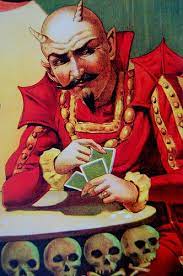
- clootie.jpg (11.16 KiB) Viewed 11632 times
-
AND . . . as the say (quite literally in this case) "the Devil is in the detail" . . .
-
-
Of course the "other devil" is being limited to 3 attachments to each posting . . .
Re: Create a button's icon with a part of a big image?
Posted: Wed Aug 10, 2022 1:16 pm
by richmond62
As a Scot, I am not overly keen on Japanese whisky, and as a poor Scotsman,
I drink . . . Jim Beam.

Re: Create a button's icon with a part of a big image?
Posted: Wed Aug 10, 2022 1:18 pm
by richmond62
So, what with Auld Clootie and myself . . .
. . . Oh, and he was not prepared to offer me a million bucks for my
Devawriter Pro he did NOT get my soul . . .
-
-
https://youtu.be/JUpZ1Npj23M
Re: Create a button's icon with a part of a big image?
Posted: Wed Aug 10, 2022 2:55 pm
by richmond62
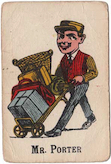
- Original image
- MrP.jpg (33.95 KiB) Viewed 11603 times
-
If you are going to rotate images using
angle it is important NOT to lock them
as they then will be distorted.
-
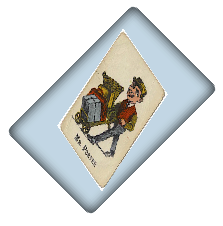
- Distorted
- SShot 2022-08-10 at 16.53.10.png (32.86 KiB) Viewed 11603 times
-
If you are going to rotate images using
rotate just DO NOT as you get something that looks like a goat
has been nibbling round the edges.
-
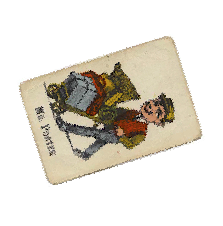
- Chewed.
- SShot 2022-08-10 at 16.54.45.png (50.27 KiB) Viewed 11603 times
Re: Create a button's icon with a part of a big image?
Posted: Wed Aug 10, 2022 6:02 pm
by jacque
So my question is: is there a way to restrain the "hot" rectangle of the dragged image?
Instead of intersect, use "the mousecontrol" which returns the control under the mouse pointer. That way only one control will hilite and users will quickly learn how far to drag before they see it light up.
Re: Create a button's icon with a part of a big image?
Posted: Wed Aug 10, 2022 8:16 pm
by richmond62
mouseControl
hey-ho:
If I have a 'card' containing this sort of code"
Code: Select all
on mouseDown
   grab me
end mouseDown

on mouseUp
  put the mouseControl
  on mouseUp
Every time I release the mouse what will be returned is the number of the 'card' and NOT
any target it is intersecting with . . .
So the ONLY way this is going to be of use is if the script can in some way hilight the target.
Re: Create a button's icon with a part of a big image?
Posted: Wed Aug 10, 2022 8:21 pm
by bn
richmond62 wrote: Wed Aug 10, 2022 8:16 pm
Every time I release the mouse what will be returned is the number of the 'card' and NOT
any target it is intersecting with . . .
Try
Code: Select all
on mouseDown
   grab me
end mouseDown

on mouseUp
   put the long name of the mouseControl
end mouseUp
What does it say?
Kind regards
Bernd
Re: Create a button's icon with a part of a big image?
Posted: Wed Aug 10, 2022 8:33 pm
by richmond62
-
Code: Select all
on mouseDown
   grab me
   set the coloroverlay["opacity"] of grc "Target 1" to "0"
   set the coloroverlay["opacity"] of grc "Target 2" to "0"
end mouseDown

on mouseMove
   if the mouseLoc is within the rect of grc "Target 1" then
      set the coloroverlay["opacity"] of grc "Target 2" to "0"
      set the coloroverlay["color"] of grc "Target 1" to blue
      set the coloroverlay["opacity"] of grc "Target 1" to "100"
   end if
   if the mouseLoc is within the rect of grc "Target 2" then
      set the coloroverlay["opacity"] of grc "Target 1" to "0"
      set the coloroverlay["color"] of grc "Target 2" to blue
      set the coloroverlay["opacity"] of grc "Target 2" to "100"
   end if
end mouseMove

on mouseUp
   if the mouseLoc is within the rect of grc "Target 1" then
      set the coloroverlay["color"] of grc "Target 1" to blue
      set the coloroverlay["opacity"] of grc "Target 1" to "100"
      set the loc of me to the loc of grc "Target 1"
   end if
   if the mouseLoc is within the rect of grc "Target 2" then
      set the coloroverlay["color"] of grc "Target 2" to blue
      set the coloroverlay["opacity"] of grc "Target 2" to "100"
      set the loc of me to the loc of grc "Target 2"
   end if
end mouseUp
Re: Create a button's icon with a part of a big image?
Posted: Wed Aug 10, 2022 8:38 pm
by richmond62
What does it say?
Nothing of any obvious value as it still returns the name of the top image and NOT the drop target.
-