Page 3 of 4
Re: Seeking 'beta' testers - MacOS and iOS
Posted: Mon Dec 19, 2022 9:01 pm
by richmond62
Um:
-
-
ProductName: macOS, ProductVersion: 13.2, ProductVersionExtra: (a)
Using version 1.1.53 of Calendar Library
Calling CalCheckCalendarAuth
tAuthStatus is set to : Authorized
Access is Authorized, calling local handler GetListOfEvents
GetListOfEvents fires.
Requesting events from :2022-12-01 to 2022-12-31
executing at 10:00:20 PM
LCB Error -[EKEvent allDay]: unrecognized selector sent to instance 0x7feca566daf0
Object GetEventsArray
LCB File ReadCalendarEvents.lcb
LCB Line 617
Re: Seeking 'beta' testers - MacOS and iOS
Posted: Tue Dec 20, 2022 9:36 am
by Simon Knight
Did you build for 64 bit and include ARM?
Probably not! Here is a screen shot of my build settings:
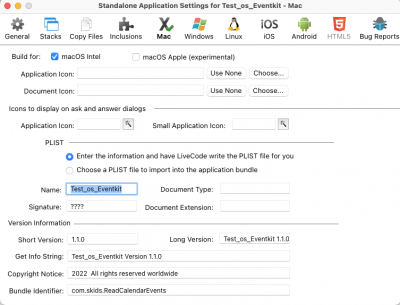
- Build settings
In future builds I will tick the experimental box. I wonder if one problem with the application is that I manually added a dot entitlements file to the package; it would not surprise me if Apple have added a check that detects modifications made post build.
The stack file running in the IDE should be using the permissions granted to the Livecode IDE e.g.
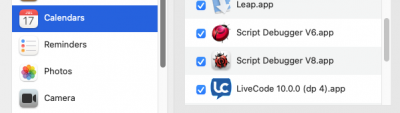
- Big Sur Privacy Pane live code version 9.6.8 being used.
Note that the version number appears incorrect but should be read as all versions up to and including v10.
The error message that Richmond posted is exactly the same line of code that failed last time meaning that my simple protective fix has not worked. I now suspect that Apple have removed a property and failed to update the documentation or they have introduced a bug into the Eventkit on Ventura. After all they report having made significant changes in that area.
If you are both still willing to help I will remove properties from the library in the hope I can bypass the issue. Also the next time I build the application I will not add anything to the 'package' plus I will build with the experimental option selected.
Here is a screen shot of the last application running on Big Sur. It also runs on Monterey.
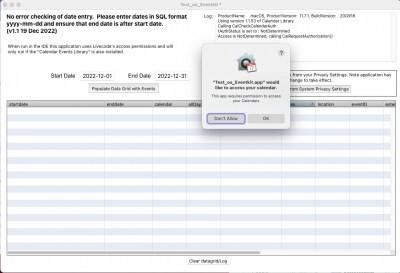
- App' first run prompting for permissions
Re: Seeking 'beta' testers - MacOS and iOS
Posted: Tue Dec 20, 2022 9:39 am
by Simon Knight
continued as unable to attach more than three images.
The application returning data.
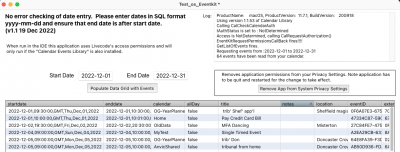
- Calendar data being displayed
so I'm not making it all up !

I need to test the cut down version of the library before I post it to dropbox just incase I've added even more problems.
Re: Seeking 'beta' testers - MacOS and iOS
Posted: Tue Dec 20, 2022 9:49 am
by stam
Simon Knight wrote: Tue Dec 20, 2022 9:36 am
The stack file running in the IDE should be using the permissions granted to the Livecode IDE
Except, to state the obvious, LiveCode has not been granted permission in my case. And I can see way to grant permission.
There is no “+” sign I can see to add apps to the permissions list and I presume something has to trigger this from livecode IDE.
As yours is the only stack I’ve run that deals with Apple Calendar, I was hoping your stack may trigger this, but it doesn’t….
Any suggestions?
Re: Seeking 'beta' testers - MacOS and iOS
Posted: Tue Dec 20, 2022 10:16 am
by Simon Knight
Updated application first.
I have built three versions : Intel only, Mac only ?ARM and both. I have not added the entitlements file as I am not convinced it is required and it may be triggering a gatekeeper response.
The version number matches the Library version and file comments have been added . The files have not been zipped.
Both check boxes checked Arm and Intel:
https://www.dropbox.com/sh/3te72fzhgho1 ... DFI8a?dl=0
Intel only :
https://www.dropbox.com/sh/0qddvxq3m289 ... CAOja?dl=0
ARM only :
https://www.dropbox.com/sh/6j1c810t6xv8 ... 11mua?dl=0
Stack file and Library to follow
Re: Seeking 'beta' testers - MacOS and iOS
Posted: Tue Dec 20, 2022 10:24 am
by Simon Knight
Re: Seeking 'beta' testers - MacOS and iOS
Posted: Tue Dec 20, 2022 10:33 am
by Simon Knight
The error that Richmond is seeing on Ventura :
executing at 10:00:20 PM
LCB Error -[EKEvent allDay]: unrecognized selector sent to instance 0x7feca566daf0
Object GetEventsArray
LCB File ReadCalendarEvents.lcb
LCB Line 617
I interpret to mean that the EKEvent property "allDay" is not being recognised. Version 1.1.54 no longer makes the call. Apple's documentation states:
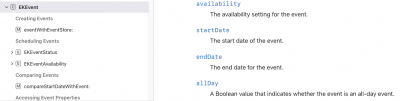
- EKEvent documentation
Line 617 was attempting to read the value of the allDay property and convert it into a string.
Re: Seeking 'beta' testers - MacOS and iOS
Posted: Tue Dec 20, 2022 6:12 pm
by Simon Knight
Stam
There is no “+” sign I can see to add apps to the permissions list and I presume something has to trigger this from livecode IDE.
As yours is the only stack I’ve run that deals with Apple Calendar, I was hoping your stack may trigger this, but it doesn’t….
Any suggestions?
Well apart from moving to Linux I have no real idea. However......
If you feel brave you can attempt to modify the SQLite database that is used to store the permissions. On Intel this can be achieved by using the tccutil command from the terminal. This may correct the situation where the database has been corrupted in some way.
From terminal :
Code: Select all
tccutil reset Calendar com.runrev.livecode
and
Code: Select all
tccutil reset AddressBook com.runrev.livecode
and perhaps
Code: Select all
tccutil reset Contacts com.runrev.livecode
as Apple seem to use either Contacts or AddressBook to refer to the same data.
These commands act as a permissions reset. After running them Livecode should prompt the user to grant permissions the next time it is run.
If the above fails then the only option is to edit the database directly by opening it in an application such as "DB Browser for SQLite". I have some notes somewhere that I will send if they are needed.
S
Re: Seeking 'beta' testers - MacOS and iOS
Posted: Tue Dec 20, 2022 9:26 pm
by stam
Hi Simon,
not sure how/if you zipped these, but the download links all provide a .zip file. Unzipping them gives me the Contents folder of the app bundle, with no actual app bundle (ie instead of seeing Test_os_Eventkit.app, I just get a folder called "Contents")
The folder "Contents" I get unzipping the linked download is:
given your comment on how you didn't zip the apps (really?) I tried just changing the extension from .app.zip to .app. Regardless of which version I try, I just get the response that the app cannot be run as it's not supported by this OS. I suspect the app needed to be zipped before transmitting as not doing so misses a vital element. Or probably more likely if you upload a folder (in this case the app.bundle), dropbox zips it for download by others and this does something funky.
If you would be kind enough to zip the files before uploading them, I'd be happy to try again...
S.
PS: tccutil did nothing to improve the situation. It did indeed reset the permissions to none; but running either liveCode or your stack did not actually give me the opportunity to add permissions. tccutil only sports the one command - reset - which of course does not add permissions.
And not sure how switching to linux would help lol
Re: Seeking 'beta' testers - MacOS and iOS
Posted: Tue Dec 20, 2022 10:01 pm
by Simon Knight
Arrrrgh!!!!
My view of drop box shows the files as .app which are packages so I guess that dropbox is zipping them in some way.
So I have put the three apps into one archive, it is 30Mbytes and should be on this link.
https://www.dropbox.com/s/b1bze0youxqak ... e.zip?dl=0
Simon
Re: Seeking 'beta' testers - MacOS and iOS
Posted: Wed Dec 21, 2022 10:18 am
by Simon Knight
I conducted some internet searches with reference to Ventura and Apple's "protection" mechanisms. Apple acknowledge that Ventura has issues with "Full Disc Access" with applications being listed as having access yet being denied. The forum of the note taking application Obsidian reports issues getting access to Calendar items:
https://forum.obsidian.md/t/calendar-pe ... tura/46165.
So I wonder if the issues you both are seeing are more to do with Ventura than my Library. I have one last idea that I can try if the latest versions of the library and test application (links above) fail and that is to add the file Entitlements.plist via the Livecode standalone settings panel. However I do not believe this is necessary because there are three types of application protection :
1. - Nil, the old wild west no requirement for entitlements, developer ID etc - this is my test app.
2. - Hardened : requires entitlement file and be processed by Automatic Apple processing to generate and register some form of code (code-signing) available as a terminal command. Gatekeeper uses to confirm that nothing nasty has been added en-route to the computer trying to run the application.
3. - Full Sandbox : all hardened plus code notarisation by Apple. Full on Big Brother and required if Application is to be sold on the Application Store.
Note that the requirements for 2 and 3 overlap and are described across various documents published by Apple and are not very clear to me in so far as they assume that the reader knows what the terminology actually means. This link may be of interest
https://wiki.freepascal.org/Hardened_runtime_for_macOS.
For unknown reasons Richmond is able to run the stack file whereas Stam is not. Richmond's version of Livecode is listed in the Privacy pane, Stam's is not. Perhaps this comes down to the status of the Privacy Pane at the time Ventura was installed.
I hope it is obvious that I may be writing rubbish but it would be useful to know what is going on.
Simon
Re: Seeking 'beta' testers - MacOS and iOS
Posted: Wed Dec 21, 2022 10:35 am
by stam
SUCCESS!
Again the dropbox weirdness of navigating into a zip like it's a folder and treating app bundles like normal folders does no one any favours.
But I did eventually just get it and clicked 'download even though I was just seeing 3 folders - and got 3 apps. I tested the ARM app and it worked fine.
This time it asked me for permission and was granted.
It instantly loaded a bunch of events from my calendar - I've not checked to see if it found
everything as I have about 20 calendars, but it certainly did find many.
Log text:
ProductName: macOS, ProductVersion: 13.0.1, BuildVersion: 22A400
Using version 1.1.54 (all boolean values removed) of Calendar Library
Calling CalCheckCalendarAuth
tAuthStatus is set to : NotDetermined
Access is NotDetermined, calling CalRequestAuthorization()
EventKitRequestPermissionsCallBack fires!!!!
GetListOfEvents fires.
Requesting events from :2022-12-01 to 2022-12-31
110 events have been read from your calendar.
HTH
S.
Re: Seeking 'beta' testers - MacOS and iOS
Posted: Wed Dec 21, 2022 10:40 am
by stam
Simon Knight wrote: Wed Dec 21, 2022 10:18 am
Perhaps this comes down to the status of the Privacy Pane at the time Ventura was installed.
This is probably correct. If I get a chance I'll fire up an old intel Mac running MacOS Mojave and run the stack again if I have time (but time is scarce).
Certainly the stack did not ask me to grant permissions on MacOS Ventura - but as above, your latest
standalone does and it works as expected (I guess - I've not checked to see if all calendars have been retrieved).
S.
Re: Seeking 'beta' testers - MacOS and iOS
Posted: Wed Dec 21, 2022 12:43 pm
by Simon Knight
Thats great news although I wish I knew why it has started working. One reason is that I have just raised a bug report,
https://quality.livecode.com/show_bug.cgi?id=24054
So to be clear you have confirmed that the Arm version of the application works when using version 1.1.54 of the Library.
Did you press the button a second time to confirm that the app did not ask for permission a second time ? Don't worry if not it should work ok as it is ok on Big Sur and Monterey.
Big Thanks and Merry Christmas.
Simon
Re: Seeking 'beta' testers - MacOS and iOS
Posted: Wed Dec 21, 2022 12:52 pm
by stam
Yes, I only tested the ARM version. Keep in mind I had reset privileges with tccutil, so no app was listed in the calendar permissions pane.
On clicking the populate button (once), it brought up the dialog box to ask for permission, it was granted and everything worked as expected.
What happened with the stack previously was that it did not ask for permission - I only tested the stack because the previous app you released had the same issue as the the one I reported, causing issues because the app was uploaded unzipped.
This current app works as expected. I presume this includes a manifest etc that enables asking permissions or some such.
========================
EDIT: all 3 versions work on my M2 MacBook Air. Interestingly, every time I launch a different app, it seems to reset the permissions and I need to grant them again; but once granted, relaunching the same app just works without having to grant permissions again - not sure if that's what you were asking?