Page 3 of 5
Re: Dialog box selections using keyboard.
Posted: Sat Feb 18, 2023 2:44 am
by dunbarx
Richmond. I did not want to point out your spelling error. Though maybe in the UK that is the way?
Americans are not barbarians, in spite of what the entire rest of the world thinks. In fact, one of my favorite tropes is "Americans are not al all militaristic. They are, however, quite warlike"
Craig
Re: Dialog box selections using keyboard.
Posted: Sat Feb 18, 2023 8:00 am
by richmond62
I know Americans are not barbarians.
All I wanted to say was that when I was studying in America, because I had be edicated in Britain I could not write ptoper American English, as when I attempted to I ended up with a mixture of British and Amerivan English which looked ridiculous.
Re: Dialog box selections using keyboard.
Posted: Sat Feb 18, 2023 9:23 am
by richmond62
HOWEVER: muddy boots or not, in an attempt to get vaguely back on topic . . .
. . . Jef Raskin [who knew his stuff] was NOT keen on things like mice and trackpads
https://en.wikipedia.org/wiki/Jef_Raskin
and was designing, before his untimely death, a keyboard-only way of working with a WIMP GUI,
and certainly for people with certain types of physical disabilities this can be advantageous.
So:
-
-
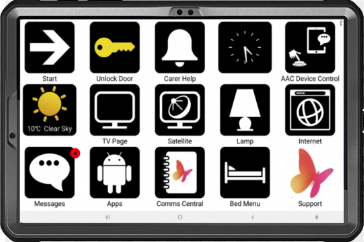
a keyboard-driven modal choice thing is NOT as daft as it sounds, and may be put to good use where
an interface is required for people who are disabled:
https://www.possum.co.uk/
-
- SShot 2023-02-18 at 10.15.29.png (75.44 KiB) Viewed 6711 times
-
It would be relatively easy to set up this sort of thing with icons in LiveCode where selection could be via breath control or lip movement.
-
-
I remember working at a Cheshire Home in Brixham, Devon in England (1982) with severely disabled people: and a fantastic chap there,
although flat on his back with the ability to move 3 fingers on one hand had written 3 books on natural history using an early Possum
interface.
Re: Dialog box selections using keyboard.
Posted: Sat Feb 18, 2023 9:34 am
by richmond62
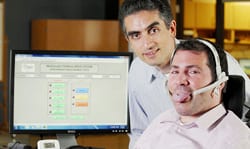
Or tongue movement:
-
- tongue-wheelchair.jpg (8.21 KiB) Viewed 6708 times
-
The 'thing' that always needs to be remembered with these sort of things is that the programmer will have to work
on the basis that the person interacting with their program will have no more than 3 possible actions they can perform:
1. Sideways tongue movement.
2. Teeth clench on tongue.
3. Tongue retraction.
[for the sake of argument: although it would be instructive to have a quadraplegic person
demonstrate what they can do with their tongue].
Re: Dialog box selections using keyboard.
Posted: Sat Feb 18, 2023 10:58 am
by richmond62
Imagine, also, if you will:
An IDE for LiveCode that could be completely controlled via the arrow keys and the RETURN and/or ENTER key,
so that LiveCode could become the programming environment of choice for teaching disabled people, and
the programming environment of choice for disabled people to develop software . . .
Mind you, I have been throwing ideas like this into the wind for years with nary a peep from top-dead-centre.
-
Re: Dialog box selections using keyboard.
Posted: Sat Feb 18, 2023 7:31 pm
by richmond62
Wow: look at this bloke: he's obviously got limited motor abilities: BUT, with a
joystick,
allowing him at least 4 actions, he can achieve a lot with a computer:
https://lifetec.org.au/dales-story/
-
-
A LiveCode IDE controlled by those 4 movements would be "just the ticket" for people with severe physical problems
to get productive in programming terms.
-
- SShot 2023-02-18 at 20.30.32.png (141.94 KiB) Viewed 6649 times
-
Sheer Joy! Back to the Future.

A joystick with 5 signals sent via USB: UP, DOWN, LEFT, RIGHT and FIRE could be 'tied' very easily to the Arrow keys and the ENTER key
on a standard keyboard.
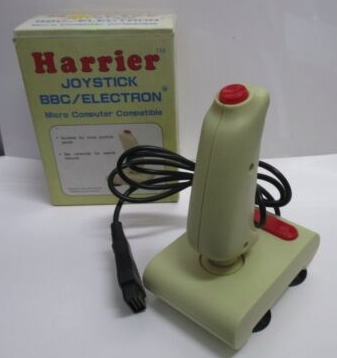
One of the things that I can see about what this company has to offer is that they do NOT offer disabled people the chance to actually program computers, merely use computers as ways to communictae with other people.
I really wonder of this bloke would not find a suitably modified LC IDE ever so slightly more stimulating than
what he is faced with in this picture:
-
Re: Dialog box selections using keyboard.
Posted: Sat Feb 18, 2023 7:45 pm
by richmond62
I suppose I should invest in one of these:
-
-
although I do feel it has far too many fancy buttons for my purposes.
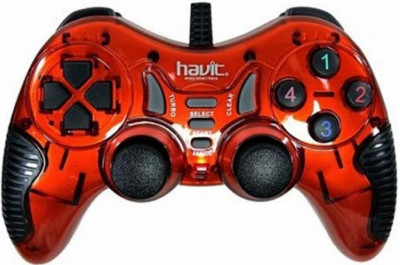
BUT, here in Bulgaria, at least, when one types 'joystick' into a search engine something like 99%
of the results end up like this:
-
- wrong.jpg (40.07 KiB) Viewed 6642 times
-
which is NOT really much good.
Re: Dialog box selections using keyboard.
Posted: Sat Feb 18, 2023 7:51 pm
by richmond62
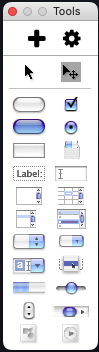
So, we would have to start off with a BIG toolBar stack:
-
- SShot 2023-02-18 at 20.46.33.png (19.27 KiB) Viewed 6641 times
-
Where objects could be selected via arrow keys [i.e. joystick controls],
and then copied across to a stack with the FIRE [ENTER] button.
The object could then be nudged around the stack using arrow keys again,
and then fixed [locked] with the FIRE button.
Presumably an arrow key + FIRE button combination could be used to open a
preferences palette, panel navigation would be via LEFT and RIGHT arrow keys,
name entry and so on would requitre a pop-up keyboard on-screen using, Yup, you guessed it, arrow keys and the FIRE button.
Re: Dialog box selections using keyboard.
Posted: Mon Feb 20, 2023 9:53 am
by richmond62
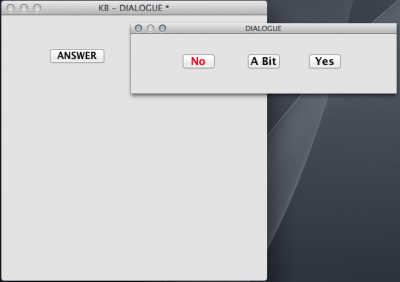
Corrected stack:
-
- fakeDialog.png (57.28 KiB) Viewed 6576 times
Re: Dialog box selections using keyboard.
Posted: Mon Feb 20, 2023 10:06 am
by CAsba
Richmond62
I downloaded the revised stack. I can't figure how I could use this - no access to the coding for the selection buttons...
Re: Dialog box selections using keyboard.
Posted: Mon Feb 20, 2023 11:12 am
by richmond62
That is because the stack opens as a
PALETTE.
To open the palette as an accessible stack you need to do this:
Open the Application Overview thing:
-
-
Select the DIALOGUE stack:
-
-
Do a Double click and the palette will reopen as a stack:
-
-
Then you can open the stack's
cardScript.
Re: Dialog box selections using keyboard.
Posted: Mon Feb 20, 2023 7:08 pm
by jacque
If you don't want to mess with the overview, another way is to use the contextual menu when the browse tool is active:
Mac: ⌘+shift+control+click
Windows: control+shift+right click
In the menu that appears, choose Stack Mode and select Toplevel. This is especially useful if you've opened a modal dialog and forgot to provide a way to close it.
Re: Dialog box selections using keyboard.
Posted: Mon Feb 27, 2023 4:09 pm
by richmond62
-
This
Thrustmaster comes with no Mac driver, but
USB Overdrive allowed me to set the joystick to up, down, left, right and RETURN,
which, in turn delivers Unicode chars to LiveCode.
Re: Dialog box selections using keyboard.
Posted: Sat Mar 11, 2023 8:42 pm
by richmond62
-
Code: Select all
on openStack
   set the textColor of btn "b1" to blue
   put "1" into fld "kee"
   focus on btn "b1"
end openStack

on arrowKey AK
   if AK = "right" then
      put fld "kee" into KEEE
      set the textColor of btn ("b" & KEEE) to red
      add 1 to KEEE
      put KEEE into fld "kee"
      if exists(btn ("b" & KEEE)) then
         set the textColor of btn ("b" & KEEE) to blue
         focus on btn ("b" & KEEE)
      end if
   end if
end arrowKey

on enterKey
   send "mouseUp" to the focusedObject
end enterKey

on closeStack
   put 1 into Kred
   repeat until Kred > 21
      set the textColor of btn ("b" & Kred) to red
      add 1 to Kred
   end repeat
end closeStack
The ERROR dialog that is being thrown up to me makes no obvious sense.
Re: Dialog box selections using keyboard.
Posted: Sat Mar 11, 2023 10:07 pm
by bn
richmond62 wrote: Sat Mar 11, 2023 8:42 pm´
Code: Select all
on arrowKey AK
   if AK = "right" then
      put fld "kee" into KEEE
      set the textColor of btn ("b" & KEEE) to red
      add 1 to KEEE
      put KEEE into fld "kee"
      if exists(btn ("b" & KEEE)) then
         set the textColor of btn ("b" & KEEE) to blue
         focus on btn ("b" & KEEE)
      end if
   end if
end arrowKey
The ERROR dialog that is being thrown up to me makes no obvious sense.
Is the "travesalOn" for that button set to true?
The dictionary mentions for "focus"
If the object's traversalOn property is false, it cannot receive the
focus, and the focus command causes an error.
Kind regards
Bernd