Are you developing tools to extend the LiveCode environment? This is the place to talk about the nuts and bolts of extending our nuts and bolts. If you want to use a LiveCode or third party Environment extension, visit the Using Evironment Extensions forum.
Hello,
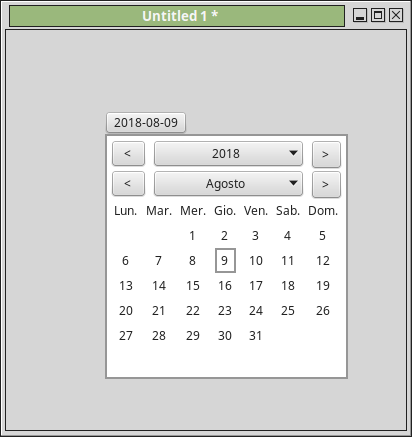
I just released my free calendar plugin. The missing control in livecode
The official page is here: http://www.maxvessi.net/pmwiki/pmwiki.p ... ndarPlugin
It's a simple calendar to pick date for Livecode that owrks with any version of livecode, it has the following features:
multilanguage support (write me if you don't find your language)
first day of week customizable
auto positioning, so it's always all visible inside the card
To use it just unzip it and copy the file in you Livecode default folder, usually are these:
Windows: C:\Documents and Settings\max\Documenti\My LiveCode\plugins
Mac: /Users/max/Documents/My LiveCode/Plugins
Linux: /home/max/my_livecode/Plugins/
Now click Development -> Plugins -> CalendarPlugin, this way a menu to add the calendar button will appear. You can set your preferences from the panel or via script in your program.
You can always set these properties:
pdate : set the day of the button ("YYYY-MM-DD")
firstDay: set the first day of the calendar (1 = Sunday)
lang: set the language for months and week days. Send me an email for adding other languages
pTextColor: set the text color of calendar panel
pBgColor: set the text color of calendar backgroung panel
pBtnTextColor: set the text color of calendar button
pBtnBgColor: set the background color of calendar button
Screenshots:
Livecode Wiki: http://livecode.wikia.com
My blog: https://livecode-blogger.blogspot.com
To post code use this: http://tinyurl.com/ogp6d5w
Hello,
I just returned from my holidays ( just 7 days with not much wifi ), so I read now your comments.
Here the answers:
FourthWorld wrote: Thu Aug 09, 2018 2:02 pm
Thanks. Looks very nicely done. Will license info be provided? Without explicit licensing terms no one can know if they can use it.
Well, frankly I don't care. I put GPL3, but someone suggested me that it's better MIT license. What do you prefer?
MaxV wrote: Thu Aug 09, 2018 1:35 pm
... works with any version of livecode,
Um, May want to change that from 'any version' to Lc 7.x and above
(Did not show up in 6.5.x, error is "not a stack")
Really? It's a standard plugin. probably you just need to change the extension or open with 7 and use save as version 6. Please let me know.
Well, the "is not a stack" error means you probably wrote it in 7.x (or really any version higher than 6.x), before they changed the message to the "written in a newer version" for stack format changes.
I did indeed save the stack in the legacy 5.5 format, and since that allowed it to open in earlier versions, I did free up about 10 minutes to do some testing.
One thing that jumped out at me almost immediately is that you might want to set up some testing for the date format. I understand most of the world uses a format like y-m-d, but someone should be able to format to their local standard, either by choosing system date or by setting it up custom. Alternately, you could force the date by not allowing modification of that text field
Rest of it seemed to work well though. Here is the saved backwards version, good down to 5.5 format. I doubt anyone else is using Mc that couldn't save it back to that period.
jmburnod wrote: Mon Aug 20, 2018 7:08 pm
Hi Max,
Thanks for share
I see you forgot french langage in your langage menu.
I added "FR" and it works fine
Best
Jean-Marc
I have 5.5 on a MacBook Pro Sierra and, as you say, I can open the file now but I can't get it to show up under the Plugins menu item. The developer indicated that, for Mac, the file should be in the "MyLiveCode/Plugins" folder, which is where I copied it. Any ideas? I've never used a plugin in LC before, so the overwhelming likelihood is that I did something mind-bogglingly stupid and/or I've overlooked something really obvious.
Thanks very much for taking the trouble to scale this down to 5.5.
Heya fritzdekatt,
I'll first mention there is a lesson on how to do this correctly, but it is kind of misleading (at least, I found it so).
Now, how to get the plugin to show up. The folder you made is in the right location, you have to change a setting in the preferences in Lc. Click on 'Files & Memory', and go to the box that says "User extensions". Change that to the My 'Livecode' folder. Now the plugin should show up.
Change your place!
After that, restart Lc and you should see this -
WEEEEEeeeeeee!
I should mention that it is likely that if you moved the Plugins folder into the extensions folder, you probably wouldn't have to change any preferences.
bogs wrote: Sun Feb 03, 2019 11:19 pm
Re: ANN: Calendar Plugin
I neglected to mention that I did indeed check and set the folder in preferences. It might be informative to someone to mention also that I had neither a plugins or extensions folder originally. It's my understanding that LC 5.5 didn't use extensions (obviously I could be mistaken) but it does support plugins. I might be trying to make a silk purse out of a sow's ear by continuing to use 5.5 (which is a commercial version from before they had an "indy" version). I can compile Mac apps with ease, but anything that requires XCode like IOS apps won't work at all. The versions of XCode required won't install on Sierra.
When I installed the latest community version, I installed a calendar extension with no difficulties. I will review this lesson you kindly sent me and see if anything good happens. To cure my XCode difficulty I will probably upgrade to the Community Plus edition just to get my feet wet with making an open source IOS app. If I actually learn enough about LiveCode to justify it, I might overcome my natural frugality to get an Indy license. I never did much with LC when I actually got my original license (which was perpetual), so I'm trying to catch up.