Drag and drop question.

Got a LiveCode personal license? Are you a beginner, hobbyist or educator that's new to LiveCode? This forum is the place to go for help getting started. Welcome!

Moderators: FourthWorld, heatherlaine, Klaus, kevinmiller

Omar319
Posts: 14
Joined: Sun Apr 27, 2008 10:57 am

Drag and drop question.

Post by Omar319 »

Hi,
I've already made a drag and drop game but I have a small problem.
I drag a field into a box and if it matches the target the score goes up in a separate field. But there is a way around this by dragging it into the correct target and constantly clicking so the score goes up. Is there any way to lock them when they are in the target location?
Image
Mark
Livecode Opensource Backer
Posts: 5150
Joined: Thu Feb 23, 2006 9:24 pm
Contact:

Post by Mark »

Post your script, Omar

Mark
The biggest LiveCode group on Facebook: https://www.facebook.com/groups/livecode.developers
The book "Programming LiveCode for the Real Beginner"! Get it here! http://tinyurl.com/book-livecode
Omar319
Posts: 14
Joined: Sun Apr 27, 2008 10:57 am

Post by Omar319 »

Code: Select all

global my_old_position

on mouseDown
  set the layer of me to the num of controls
  put the loc of me into my_old_position
  grab me
end mouseDown

on mouseUp
  if within (img "Yellow" ,the loc of me) then
    add 1 to field "Answer"
  else
    move me to my_old_position
    subtract 1 from field "Answer"
  end if
end mouseUp
I'd like to lock the field once it's within the target location unless the reset button's pressed.

Thanks,
Omar :)
Mark
Livecode Opensource Backer
Posts: 5150
Joined: Thu Feb 23, 2006 9:24 pm
Contact:

Post by Mark »

Hi Omar,

I posted a script here, but I have noticed that it doesn't work. I am not sure what your problem is, but I guess that the "move" command is too slow. Why don't you set the loc at once?

set the loc of me to my_old_position

This line set the loc instantly, too quick for the user to interfere with additional mouseClicks.

Best,

Mark
Last edited by Mark on Thu Oct 02, 2008 11:03 pm, edited 2 times in total.
The biggest LiveCode group on Facebook: https://www.facebook.com/groups/livecode.developers
The book "Programming LiveCode for the Real Beginner"! Get it here! http://tinyurl.com/book-livecode
Jerry Daniels
Posts: 10
Joined: Sat Mar 11, 2006 5:11 pm
Contact:

Drag and Drop the easy way

Post by Jerry Daniels »

Omar, is there some reason you're not using the built-in drag and drop that rev 2.9+ offers? It's documented in the User Guide.
[img]http://daniels-mara.com/hosted_images/dm_logo.png[/img]
[b]Jerry Daniels[/b]
[size=92]Daniels & Mara, Inc.[/size]
[size=84]Creator of [url=http://glx2.com][b]GLX2 Tools[/b][/url]
Host of [url=http://revmentor.com][b]Rev Mentor[/b][/url][/size]
malte
Posts: 1098
Joined: Thu Feb 23, 2006 8:34 pm
Contact:

Post by malte »

Almost hate to say it, but this screams for animationEngine. <g>

If you are interested in an example how to do this with AE, I'd cook it up. If not, please ignore this post.

Cheers,

Malte
Randy Hengst
VIP Livecode Opensource Backer
Posts: 157
Joined: Thu Jun 29, 2006 4:16 pm

Post by Randy Hengst »

Hi Malte,

I've been following this tread and have AE, but haven't begun to work it. I'd be interested in seeing drag drop with AE.
malte
Posts: 1098
Joined: Thu Feb 23, 2006 8:34 pm
Contact:

Post by malte »

Hi Randy,

I'll cook up a stack. :) Family is demanding this weekend (need to harvest our apples), so it is unlikely to be before monday though.

Cheers,

Malte
Randy Hengst
VIP Livecode Opensource Backer
Posts: 157
Joined: Thu Jun 29, 2006 4:16 pm

Post by Randy Hengst »

Hi Malte,

Thanks for your willingness to do this. I'll look forward to seeing it, but there's no hurry. I, too, have plenty of family events this weekend.

take care,
randy
malte
Posts: 1098
Joined: Thu Feb 23, 2006 8:34 pm
Contact:

Post by malte »

Hi,

couldn't resist. :-)

the stack is here:

http://derbrill.de/revstack/AEDrag.rev

It requires animationEngine to be loaded and in use. Open up animationengine and type

start using stack "animationEngine" into the messagebox.

I created a stack, 1 button,3 flds, 3 grcs. LockText of flds=true, traversalOn=false. Each field owns a custom property calle cInitialPositian, which holds the loc, the field should snap back to. The script in the reset button calls a handler "resetGame" in the card script. The card owns this script:

Code: Select all

--> all handlers

-- quick AE drag and drop Demo

on openCard
    resetGame
end openCard

on resetGame
    if "animationEngine" is not among the lines of the stacksinuse then
        if "animationEngine" is among the lines of revLoadedStacks("application") then
            start using stack "animationEngine"
        else
            answer "This stack needs animationEngine to run!"
            exit resetGame
        end if
    end if
    aeLockMoves
    aeMoveTo the long id of fld "fld,red",the cInitialPosition of fld "fld,red",200,"inout"
    aeMoveTo the long id of fld "fld,green",the cInitialPosition of fld "fld,green",200,"inout"
    aeMoveTo the long id of fld "fld,yellow",the cInitialPosition of fld "fld,yellow",200,"inout"
    aeUnlockMoves
    set the constrainRectangular of fld "fld,red" to the rect of this card
    set the constrainRectangular of fld "fld,green" to the rect of this card
    set the constrainRectangular of fld "fld,yellow" to the rect of this card
end resetGame

on constrainRectangularExit
    local tColor
    put item 2 of the short name of the target into tColor
    if the mouseloc is within the rect of grc ("grc,"&tColor) then
        set the constrainRectangular of the target to empty
        aeMoveTo the long id of the target,the loc of grc ("grc,"&tColor),300,"overshoot"
    else
        aeMoveTo the long id of the target,the cInitialPosition of the target,350,"bounce"
    end if
end constrainRectangularExit
If you have any questions, please feel free to ask.

Cheers,

Malte
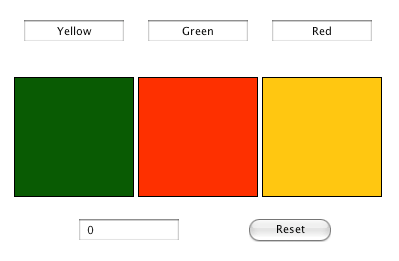
Randy Hengst
VIP Livecode Opensource Backer
Posts: 157
Joined: Thu Jun 29, 2006 4:16 pm

Post by Randy Hengst »

Malte,

Very helpful. Thanks for taking the time to do this.

take care,
randy
malte
Posts: 1098
Joined: Thu Feb 23, 2006 8:34 pm
Contact:

Post by malte »

Glad it helps randy. I really must write more tutorials. However, that works best when I see a situation where I think AE might help, or if something is requested.

Cheers,

Malte
SparkOut
Posts: 2984
Joined: Sun Sep 23, 2007 4:58 pm

Post by SparkOut »

Yes thank you Malte, it's true this situation screamed for AE, as you say. I haven't worked with AE enough to realise the simplicity and efficiency of code that can be realised with this engine. Brilliant.
malte
Posts: 1098
Joined: Thu Feb 23, 2006 8:34 pm
Contact:

Post by malte »

Thanks for the kind words sparkout. :)

I try my best to keep AE in a good shape. I rely on it in almost every project I start, so it is high on my priority list to make it work efficiently.

All th best,

Malte
Mark
Livecode Opensource Backer
Posts: 5150
Joined: Thu Feb 23, 2006 9:24 pm
Contact:

Post by Mark »

Nice example, Malte. Thanks!

Now, what's the logic behind the constrainRectangularExit message? When does it get sent and what triggers it?

Mark
The biggest LiveCode group on Facebook: https://www.facebook.com/groups/livecode.developers
The book "Programming LiveCode for the Real Beginner"! Get it here! http://tinyurl.com/book-livecode
Post Reply
